
Three sources, and what each one wants from you
Race Control reads the boat’s own instruments rather than the tablet’s GPS, and it reads three things off the boat’s network. Those are formats, not brands: if a box puts NMEA 0183 on the network it is the second one, whoever made it — a B&G H5000 or Hercules through a multiplexer, or an NMEA 2000 bus through a gateway that converts it.
| Source | What to fill in |
|---|---|
| FaRo UDP | A UDP port. The default is 50001, and the strip marks the source (default) while that port is in use. |
| NMEA 0183 | TCP or UDP, then a port — the default is 10110. TCP also needs the gateway’s address; UDP does not. |
| Exocet | A port for the tablet to listen on — the default is 60201 — and the Exocet’s address. Both are set on the Exocet’s own sending box. |
A Pixel sur Mer Exocet feeds the tablet over that system’s own protocol rather than as NMEA 0183, carrying its calibrated channels with their units — including channels a team built in its own graph, which have no 0183 sentence at all. That link is point to point, so an Exocet already sending to another machine needs a second output configured for the tablet.
Which box needs the tablet’s address
One of the three has to be told where the tablet is and the other two do not, which is worth knowing before anyone goes looking for a setting a box does not have.
- The Exocet needs it. A reception entry on that system is a name, a port and the receiver’s address, so the tablet’s address and the port it listens on are typed into the Exocet’s sending box. The tablet prints its own address rather than leaving a crew to find it in Android’s settings — the Exocet step in SET UP TELEMETRY and the EXOCET card in SETTINGS → INSTRUMENTS both show it, or say the tablet has no wifi address yet.
- A FaRo does not. It broadcasts to the whole boat network and the tablet listens for it.
- An NMEA 0183 gateway does not either. The tablet connects out to its TCP port, or listens to its UDP broadcast, and reads only.
Give the tablet a fixed address before typing that number into the Exocet, and turn off Android’s per-network random MAC for the boat network: a reservation is keyed on the MAC address, and a tablet that rejoins with a fresh one is handed a different address while the Exocet keeps sending to the old one.
The first minute on a new boat
Take a boat that has never had a source set and the app raises SET UP TELEMETRY by itself. Two buttons do genuinely different things. LISTEN needs nothing typed: it listens on the three UDP ports the app reads by default — 50001 for a FaRo, 10110 for NMEA 0183 and 60201 for an Exocet — and reports what arrives, for about five seconds. ASK THIS ADDRESS is for a gateway that serves a stream, and opens a TCP connection to the address and port you give it. There is no network scan, deliberately: a scan finds chartplotters and printers and the marina’s coffee machine, every one a row you could tap and get nothing from.
A round ends in one of four answers, and they differ:
| What it says | What it means |
|---|---|
| Found telemetry this app reads | Tap USE THIS on the row you want. |
| Found a feed, but none of the sentences this app reads | Good NMEA 0183 carrying none of the wind, speed, heading or position sentences — usually switched off at the gateway, or on another port. The row is offered with a caution: connecting will work and the readings will stay blank. |
| Nothing heard | A result, not a dead end. Four numbered checks follow it, each something a person on deck can do in the next minute. |
| Nothing could be tried | Every target errored, so nothing ever listened. That is a fault on this tablet — a port another app is holding, an address that does not resolve — and the reasons are printed underneath. |
The setting is stored against the boat, not the tablet, so the same tablet sails a FaRo boat one weekend and a gateway boat the next without being set up twice. RESTART SOURCE re-dials the running setting untouched — the one to reach for after a gateway is power-cycled or a wifi drops and comes back, before you start editing ports.
A FaRo is the one exception: it is commissioned once by whoever installs it, in its own manager or over SSH — any SSH client will do, including one on the tablet itself. Configuring a FaRo from Race Control is not available.
What arrives, and what it is called
Whatever the source, what reaches the platform is already in the platform’s own vocabulary. The tablet sends standard channel names itself, so there is no dictionary between it and the platform and nothing to teach. Channel mapping is about the files you upload, where a column called Targ Bsp is pointed at target_boat_speed once and remembered for your organisation afterwards.

That registry is add-only and frozen: a name is an address a season of stored samples points at, so nothing is renamed and nothing is removed. Where a boat measures something it has no name for, you add a channel under the custom: prefix — though the tablet speaks standard names only, which is stated as a limit rather than left to be found.
What the strip says, working and not
Along the top of every tab: how the feed is doing, which source it is, the boat you hold, the state of the uplink, and four live readings — BSP, TWS, TWA and TWD. The feed’s own word is OFFLINE when nothing is started, WAITING when the socket is open and nothing has arrived, LIVE while packets arrive inside the freshness window, STALE when it was live and has gone quiet past it, and FAULT when the source could not start or died. A reading that goes quiet becomes an em dash rather than the last number that arrived.
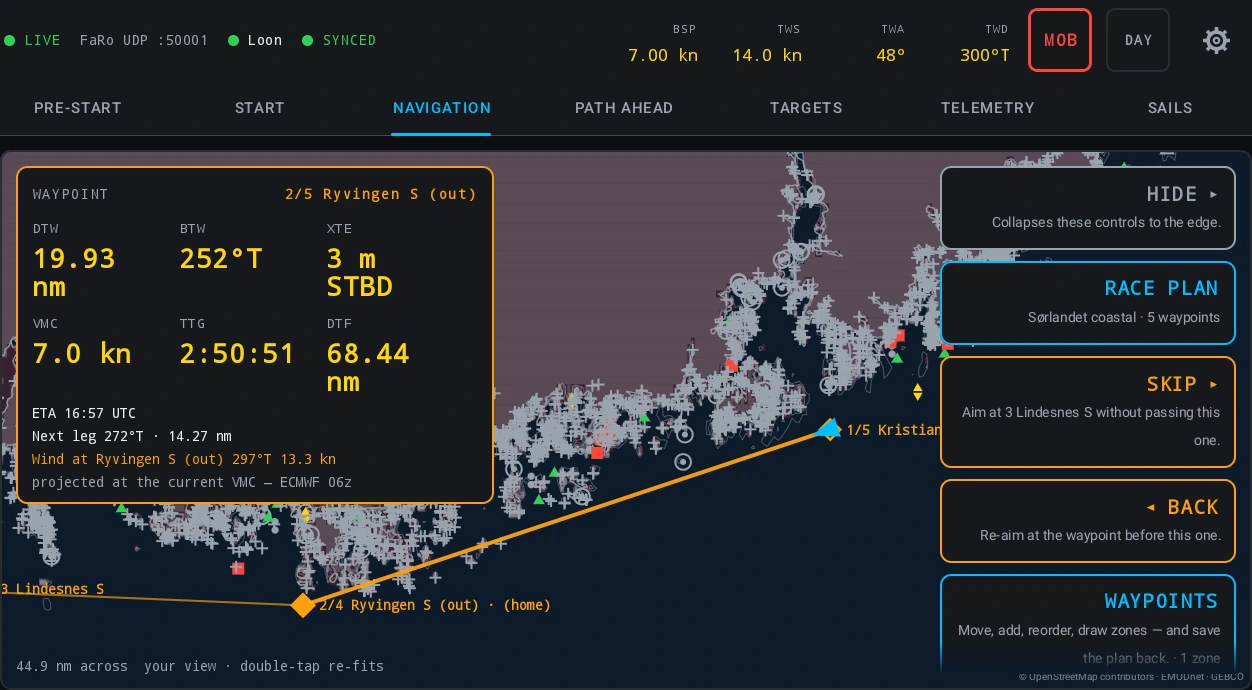
The uplink is a separate word from the feed: NO LEASE when no boat has been taken and nothing may leave the tablet, SYNCED when everything is up and acknowledged, BUFFERING n when n rows are waiting and the link is fine, and OFFLINE n when n rows are waiting and posts are failing. Both of the last two keep the data: it buffers on the tablet and drains oldest-first when the link returns, and a redelivery overlapping what was already sent counts as duplicates rather than an error.
Transmitting is a separate setting and it is off by default. In SETTINGS → INSTRUMENTS each card carries its own system’s output beside its input: the NMEA card puts the app’s own computed numbers — time to gun, time to burn, distance to the line, line bias, laylines, targets — onto the boat’s NMEA 2000 bus through a gateway, and never wind or boat speed, which are the instruments’ own. The FARO card sends the same numbers out as XDR, and the EXOCET card sends them to an Exocet. Race Control reads an Exocet and sends its numbers to one. The Exocet holds them like its own variables, so the displays it feeds show them the same way.
Read the method
The documentation this post draws on.
- Race Control on the boat — Licence to first gun: access and seats, signing in, the setup flow that finds the boat’s telemetry itself, the strip’s four states, the pre-start walk, the course, the live fleet overlay, the tabs, FINISH — and replaying the start afterwards.
- Channel mapping — Three kinds of channel name and which is which: the standard registry, your own custom: channels, and whatever your files happen to call things — plus the correction you only make once, the ledger of columns nobody has claimed, and who may change any of it.