
This is the how. What each tab does, tab by tab, is on the Race Control page, and the geometry behind the pre-start numbers is in the math. Both are linked where they matter below rather than repeated.
1 Getting it onto your boats
Race Control is an Android app, and it runs on any Android tablet you already navigate with — there is no hardware to buy from us. What it needs from the boat is telemetry: the boat’s own processor, whether that is a FaRo, a B&G or anything else putting NMEA 0183 on the network. Section 6 is how it finds it.
Three things have to happen before the first gun:
- The licence and its seats — how many boats need to run Race Control at the same time. Write to support@nordicstars.ai and tell us how the fleet sails; there is no public seat price.
- The install — yours, and it takes a minute. There is no app store listing: sign in to Nordic Stars in the tablet’s own browser, open Overview, and the app is a download on that page. Android asks once for permission to install from the browser, which looks like a refusal and is not. Later versions install over the top of the one already there, so an update is the same press and keeps the boat’s settings.
- The telemetry source for each boat — which we are happy to do with you, though the app offers to find it itself the first time a boat goes live. Section 6.
Race Control is an organisation add-on. Everything else stays on the web where it already is: boats, crew, targets, polars and the wardrobe.
2 Access and seats: two different things
This is the one part of Race Control that costs money if you misread it, so it is worth thirty seconds.
| Seats | Access | |
|---|---|---|
| Per | Organisation | Person |
| Limits | How many boats can run the app at once | Who may sign in to it at all |
| Set by | Nordic Stars, when we license you | Your own admins, in organisation settings |
So grant it to the whole afterguard, and to anyone who might end up holding the tablet. To do it: open Organization from the menu behind your initials on the web app. The panel above the members table says how many boats you are licensed for; the members table then has a Race Control column with a Grant button on each row.
Revoking confirms, because it releases any boat that person has live at the time. Granting does not — it is not disruptive.
A licensed team whose newest trimmer has no access yet is an ordinary state, not a fault. One toggle fixes it, and it changes nothing about the bill.
3 Signing in
The tablet asks for the email and password of a Nordic Stars account that has access — the same account they use on the web. There is a Google option where your organisation uses it.
Signing in gives the tablet a 7-day device session, so most mornings start with no sign-in at all. When the week is up the app asks once and carries on: that is routine, not a failure.
If the app tells you it is locked, it is licensing rather than a password: either that user has no access, or the organisation is not licensed. Both are fixed on the web in section 2, and the app has a check-again control for when they are.
4 Taking the boat
After sign-in the tablet lists your organisation’s boats and, above them, how many of your seats are in use. Tap the boat you are sailing — GO LIVE.
- The first tablet aboard claims the boat. Every other tablet that picks the same boat joins it, silently and free.
- Nothing leaves a tablet that has not taken a boat. The queue holds; it does not lose.
- A boat you are not licensed for is refused with the reason — the message names which boats are holding the seats, so you know who to ask.
To change boat later, tap the boat name in the status strip. It confirms first, since it releases the seat and pauses the uplink until a boat is picked again.
5 When there is no signal
Offshore there is no coverage, and the tablet is built for that rather than surprised by it. Everything it needs to open — who you are, your team, your licence, your boats, your plans, the polar, the wardrobe and any weather you took aboard — is written to the tablet the last time it had a link, and read back off it first the next time it starts. A tablet that cannot reach us still opens on your boats.
- The boat list says how old it is. When the picker was drawn from the tablet rather than from us it prints
Cached · last synced 2h 05m agounder the seat count. It can be missing a boat somebody added this morning; it cannot be wrong about a boat it lists. - It comes back onto the boat by itself. If the app closes or the tablet reboots — a flat battery, a drop, Android reclaiming it overnight — the next start goes straight back to the boat you were live on, with no picker, as long as it was live within the last seven days. A band across the top says
Offline · resumed Nordic Star · 3h 12m: the boat by name, so you can check in a glance that it chose the right hull. - GO LIVE works with no link, on the boat this tablet last held — the row reads RESUME OFFLINE. On any other boat it will say it cannot: taking a seat is something only we can grant, and a tablet that has never held that one has nothing to go on.
Coming back into range
The tablet asks for the seat it has been recording under — the same seat, not a new one — and there are three answers. All three arrive on their own within about a minute of the link returning, and there is nothing to press to start it.
| Answer | What happens |
|---|---|
| Resumed | The seat is confirmed and the band across the top clears. It is the same seat, so the hours you recorded offline count under it, and the whole backlog goes up in order, oldest first. This is the ordinary outcome. |
| The seat is held by another boat | Another boat on your team went live before this tablet did, so it keeps the seat. The app stops on the boat list and says which boat has it, which tablet took it and from what time, so you can call the other boat instead of guessing. Nothing you recorded is uploaded, and nothing is deleted. |
| The resume window is closed | More than seven days have passed since the seat was last confirmed, or this boat has since gone live from another tablet. The row goes back to GO LIVE, which takes a free seat if the team has one. What you recorded stays on the tablet. |
Which boats hold your team’s seats, whether each one is live online or live offline, and how long each can still resume, are on the web in organization settings, beside the licence. The last thirty days of claims that lost a seat are listed under it, one line each. They are a record of what happened; there is nothing to acknowledge and nothing to do with them.
A queue that is parked
In the two answers that are not resumed, what you recorded offline is parked: still on the tablet, still counted, and not uploaded. SETTINGS → WEATHER AND DATA → UPLINK & BUFFER says how much is parked and why, and carries the two buttons for it.
| Button | What it does |
|---|---|
| RETRY RESUME | Asks for the same seat again. This is what to press once the other boat has released it, or once your team has a free seat. A refusal changes nothing: the recording stays parked and the reason is updated. |
| DISCARD PARKED | Deletes the parked recording from the tablet, after a confirmation naming what goes. The only one of the two that loses anything, and the only way that recording leaves the tablet without being uploaded. |
Uploading it under a different seat is deliberately not offered. A seat licenses one boat for a period of time, and a race recorded under one boat’s seat must not arrive under another’s — that is the whole reason the queue parks instead of draining. Racing on now is never blocked by a parked queue: pressing GO LIVE takes a free seat and records under it, and the parked recording is left exactly where it is.
The week is up, and you are still at sea. A sign-in lasts seven days (section 3), and the eighth day can arrive a long way from a signal. The sign-in screen then offers CONTINUE OFFLINE AS you: the app opens on everything already aboard and keeps recording. Nothing uploads until somebody signs in again, and nothing is lost in the meantime. Only pressing SIGN OUT clears what the tablet is holding, which is what it is for.
If you want to know what the tablet is working from, SETTINGS on the boat list has three lines for it: whether the session is online, offline · cached or provisional live, when your team and boats were last read, and when the seat was last confirmed. They are the first thing worth reading to us if you ever call about a tablet.
6 Pointing it at the instruments
Race Control reads the boat’s own instruments, not the tablet’s GPS. It reads two things off the boat’s network: the FaRo’s feed, and standard NMEA 0183 from a wifi instrument gateway. Those are formats, not brands — if your gateway puts 0183 on the network, it is the second one, whoever made it.
A Pixel sur Mer Exocet can also feed the tablet directly, over that system’s own protocol rather than as NMEA 0183. It carries the Exocet’s calibrated channels with their units, including channels a team has built in its own graph and which have no 0183 sentence. That link is point to point: an Exocet already sending to another machine needs a second output configured for the tablet.
Because that link is point to point, the Exocet’s own sending box is set to this tablet’s address and the port the tablet listens on, and the tablet prints that address rather than leaving a crew to find it in Android’s settings. The Exocet step in SET UP TELEMETRY and the EXOCET card in SETTINGS → INSTRUMENTS both show This tablet’s address with the address beside it, or This tablet has no Wi-Fi address yet when the tablet is not on a wifi network with one. Give the tablet a fixed address before you type that number into the Exocet: reserve it on the boat’s router, or set a static address for this network in Android’s Wi-Fi settings. Turn off Android’s per-network random MAC for the boat network as well — Wi-Fi → the network → Privacy → Use device MAC — because a reservation is keyed on the MAC address, and a tablet that rejoins with a fresh one is handed a different address while the Exocet keeps sending to the old one.
Transmitting is a separate setting and it is off by default. Each card in SETTINGS → INSTRUMENTS carries its own system’s output under OUTPUT, beside the ports for the same box. The NMEA card puts the app’s own numbers — time to gun, time to burn, distance to the line, line bias, laylines, targets — onto the boat’s NMEA 2000 bus through a gateway, so a mast display can carry them, and the FARO card sends the same numbers out as XDR to FaRo displays. Neither transmits wind or boat speed: those are the instruments’ own. Which numbers go out is the slot list behind WHAT WE SEND…, described in Navigation → deck channels, and nothing in it has been checked against a physical display yet.
One bus output at a time; the Exocet link is separate. The boat holds one bus output, so switching the FaRo output on switches the NMEA 2000 output off, and back again — both cards say so on the line under the switch. The EXOCET card’s output is its own link and runs alongside either. A Pixel sur Mer Exocet creates the variables under the names the tablet gives them, so there is no field to map: the address at the top of the card is the one both halves use, and the output half adds the port the box listens on, this tablet’s answer port and a rate. Race Control reads an Exocet and sends its numbers to one. The Exocet holds them like its own variables, so the displays it feeds show them the same way. The Exocet user manual documents the link in its chapter on third-party software, section 9.3. The same output carries two man-overboard commands, NordicStars_StartMob and NordicStars_StopMob, which you wire in the Exocet’s graph to its MOB box — see AIS, alarms and man overboard.
The first minute on a new boat
Take a boat that has never had a source set and the app raises SET UP TELEMETRY by itself, before you have gone looking for a settings screen. The status strip stays where it is; the tab row is hidden until you leave. Four cards, top to bottom.
- WHAT THIS APP READS — the two formats above, and what each one needs from you. A FaRo broadcasts to the whole boat network, so there is no address to enter, only the port it sends on. A gateway does one of two things: broadcasts the same way, or serves a stream you connect to — which needs its address as well. Both numbers are in the gateway’s own documentation, on the page about NMEA or TCP output.
- FIND IT — the two buttons, and they do genuinely different things. LISTEN needs nothing typed: it listens on the three UDP ports the app reads by default —
50001for a FaRo,10110for NMEA 0183 and60201for an Exocet — and reports what arrives, for about five seconds. ASK THIS ADDRESS is for the gateway that serves a stream instead — fill in Gateway address and Port and it opens a TCP connection to it. - WHAT WAS HEARD — appears once a round has run. Every finding says what it is and where it was, and carries USE THIS. The ones the app can actually read sort to the top.
- OR SET IT BY HAND — OPEN SETTINGS, for when you already know the answer. It is the same setting either way; there is no second copy of it.
Listening borrows the ports, so a feed that is already running stops for those five seconds and comes back on the same setting afterwards. The app says so under the button, and if telemetry is arriving at that moment it asks first — PAUSE AND LISTEN or KEEP THE FEED. On a boat with nothing running yet, which is the case this flow was built for, that question never comes up. Nothing already queued for the cloud is affected either way.
The Port field belongs to ASK THIS ADDRESS. LISTEN always takes the two standard ports and never guesses past them — there is no network scan, deliberately, because a scan finds chartplotters and printers and the marina’s coffee machine, and every one of them would be a row you could tap and get nothing from. A gateway broadcasting on a port of its own is one for the editor below rather than for this flow.
Reading what it found
A finding is not automatically a working feed, and the app is careful to say which it has. Three answers are worth knowing before you meet them:
| What it says | What it means |
|---|---|
| Found telemetry this app reads | The straightforward one. Tap USE THIS on the row you want. |
| Found a feed, but none of the sentences this app reads | A gateway can be putting out perfectly good NMEA 0183 that carries none of the wind, speed, heading or position sentences Race Control reads — usually because those outputs are switched off at the gateway, or are on another port. From outside it is identical to a dead port, so the app names the sentence types it did hear and the ones it will not read. The row is still offered, with a caution: connecting will work and the readings will stay blank. |
| Nothing heard | A result, not a dead end. Four numbered checks follow it — same wifi as the instruments, gateway powered and its wifi up, the port from the gateway’s own manual, and an address as well if it serves a stream. |
There is a fourth, and it is deliberately worded as its own headline rather than folded into “nothing heard”: Nothing could be tried, when every target errored and so nothing ever actually listened. That is a fault on this tablet — a port another app is holding, an address that does not resolve — and sending that crew to check a gateway would be sending them to the wrong end of the boat. The reasons are printed underneath in plain words.
None of those next steps tells you to write to us, on purpose: there is nobody to write to from a boat, and every one of the four is something a person standing on the deck can do in the next minute.
Taking a finding, and leaving
USE THIS stores the source against the boat and says which one it took. It does not close the screen — NOT NOW in the header turns into DONE, and that is the way out.
NOT NOW is an answer for now rather than for ever. The offer comes back the next time the app starts, on that boat, until a source has actually been applied — through this flow or through the editor. Nothing records that you dismissed it; the app simply looks at whether the boat has a source yet.
Afterwards it is always one tap away: SET UP… sits at the top of SETTINGS → INSTRUMENTS, above the cards, under the two lines saying which source is running and what is being sent. Run it whenever the boat changes gateway, or when you want to know what is on the network before you start editing ports.
Setting it by hand
SETTINGS → INSTRUMENTS, behind the gear at the right-hand end of the status strip, is one card per instrument system — FARO, EXOCET, NMEA — and each card holds that system’s input and, where it has one, its output. So the port a box sends on and the port it listens on are on one card, under the name written on the box. The card the boat is reading from has USE AS SOURCE selected and shows its fields; every other card shows one line saying it is not this boat’s source, and pressing USE AS SOURCE there switches the tablet to it. The rest of each card’s text is folded behind a DETAILS row (section 16).
| Card | What to fill in |
|---|---|
| FARO | A UDP port. The default is 50001. |
| NMEA | TCP or UDP, then a Port — the default is 10110. TCP also needs the gateway’s address; UDP does not. |
| EXOCET | The Exocet address at the top of the card, which both halves share, and Port the box sends to — the port this tablet listens on; the default is 60201. Both are set on the Exocet’s own sending box. |
- Press USE AS SOURCE on the card for the system you are reading, and the transport as well on the NMEA card.
- Check the port, and fill in the address if the field asks for one.
- Press APPLY. The card’s health word tells you what happened.
RESTART SOURCE beside it re-dials the running setting untouched — that is the one for a gateway that was power-cycled, or a wifi that dropped and came back. Reach for it before you start editing ports.
OPEN ITS PAGE stands beside every address field on these cards — the gateway’s address on TCP, the Exocet’s, and the address a card is transmitting to — and opens that address in the tablet’s own browser. It opens the box’s own configuration page when the box serves one on the standard port; a box that serves none there gives the browser’s error instead, which is a page you can read. The button is inactive while the field is empty, and there is none beside the FaRo port, which is a port and not an address.
Which box needs the tablet’s address
One of the three sources has to be told where the tablet is, and the other two do not — worth knowing before anyone goes looking for a setting a box does not have.
- The Exocet needs it. That link carries one sender to one receiver, and a reception entry on that system is a name, a port and the receiver’s address — so the tablet’s address and the port it listens on are typed into the Exocet’s own sending box.
- A FaRo does not. It broadcasts its
$PSTRsentence to the whole boat network and the tablet listens for it on UDP port50001, the default; the status strip marks the source(default)while that is the port in use. - An NMEA 0183 gateway does not either. The tablet connects out to the gateway’s TCP port, or listens to its UDP broadcast, and reads only.
None of this needs a laptop aboard. An Exocet and an instrument gateway are each configured on the box’s own web page, and OPEN ITS PAGE opens that page in the tablet’s browser. A FaRo is the one exception: it is commissioned once by whoever installs it, in FaroManager or over SSH with text edits, and any SSH client will do it — including one on a phone, or on the tablet itself. Configuring a FaRo from Race Control is not available.
7 The status strip and the tab row
Along the top, always: how the feed is doing, which source it is, the boat you hold, the state of the uplink, and four live readings — BSP, TWS, TWA, TWD. A reading that has gone quiet becomes an em dash rather than the last number that arrived.
At its right-hand end sit three controls that are on screen on every tab and over the settings room: MOB, DAY/NIGHT, and the gear.
The tabs
Under the strip, left to right:
| Tab | What it is for |
|---|---|
| PRE-START | Pings, the sequence, the line, time to line, FINISH. |
| START | The final minutes as one picture: time to gun, the burn, how far under the line you are, PERF and the line itself. |
| NAVIGATION | The chart: the course, the laylines, the wind and current overlays, and the race plan when one is loaded. |
| PATH AHEAD | The routed course ahead, leg by leg. The only tab that comes and goes — it is there while a coastal or offshore plan with a route is loaded, and absent otherwise. |
| TARGETS | The boat’s tuning table at the live wind. |
| TELEMETRY | The crew’s own instrument tiles. |
| SAILS | Up, down, swap, docked. |
A windward/leeward day therefore has six tabs and a routed coastal or offshore race has seven. Everything before the gun is identical on both: the pings, the sequence, the line, all four time-to-line tiers, STOP, the recalls and FINISH do not change with the kind of race.
The uplink says one of four things:
| State | Means |
|---|---|
| NO LEASE | No boat taken yet, so nothing may leave the tablet. Section 4. |
| SYNCED | Everything is up and acknowledged. |
| BUFFERING n | n rows waiting and the link is fine. Normal at sea. |
| OFFLINE n | n rows waiting and posts are failing. |
Both of the last two keep the data. Nothing on the boat is lost to a dead spot: it buffers on the tablet and drains oldest-first when the link comes back, and a redelivery overlapping what was already sent is counted as duplicates rather than an error. Neither number is a reason to do anything on the water.
8 The pre-start walk
Everything below is on the PRE-START tab, in the order a crew does it.
Ping the ends
Sail to each end and press its button — PIN and RC. One tap each; the position comes off the boat’s own instruments. Under each button, the app says whether that end is pinged, and how old the ping is.
Once both ends are in, the buttons lock themselves. The lock toggle above them buys exactly one ping and re-locks the moment either end is taken. That is what stops a bag or a glove re-pinging the line at T−30.
Re-ping freely when the committee moves an end or drags an anchor. The platform uses the most recent ping at or before the moment being asked about, so the debrief still replays the start against the line as it stood at the gun.
Arm the sequence
Pick 3 MIN, 5 MIN or 10 MIN to match the committee, and press START on the warning signal. The countdown fills the card, and past the gun it counts up for two more minutes.
START leaves the card the moment the sequence is armed and STOP takes its place — there is deliberately no cancel.
Read the line
The LINE card carries three numbers — DIST, LENGTH and BIAS — and names the favoured end, or says the line is square. Over the line, DIST says OVER and tells you how far back you have to come.
Being over is not a separate calculation; it is the sign of the distance you were already being shown, which is why the readout can never disagree with itself. The start line works it through, including why a square line inside a metre is reported as square rather than flickering.
Read the approach
TIME TO LINE answers four ways at once: CURRENT at the speed you are doing, TARGET at target on the same course, ROUTED for the fastest sailable route with your own tack and gybe cost charged to it, and SPEED, which turns the question round: the most boat speed you can carry at this angle and still not be early — the trimmer’s number.
The big number on top is the burn: the seconds to kill before resuming the speed and angle that make the gun. What the gaps between the tiers are telling you is Time to the line.
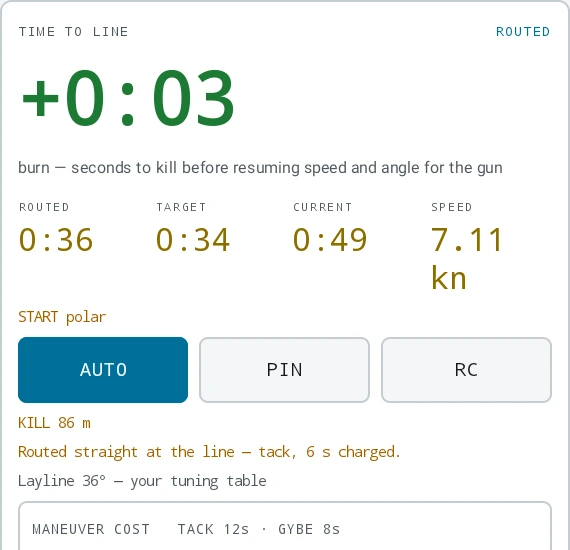
The tack and gybe costs the routed tier charges are yours to set, in SETTINGS → BOAT → TUNING. They are stored on the tablet. The MANEUVER COST panel at the foot of the card prints the pair in force, which is how you check them without leaving the tab.
The last minutes, on START
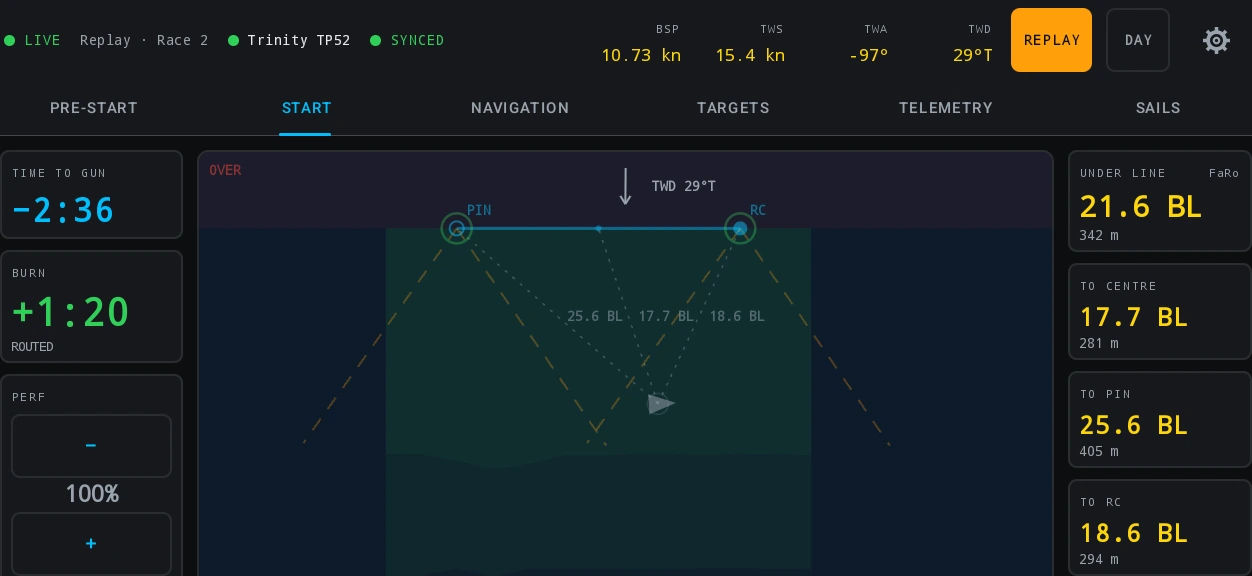
START is the same approach on one full-screen picture: time to gun, the burn, how far under the line the bow is, the PERF scalar with a step either side, and the line itself. It carries no chart layer and no sea layer, and it is the tab a helm sails the approach on while somebody else works PRE-START.
9 STOP, and the two kinds of recall
One red STOP covers the whole armed sequence: a postponement before the gun, a general recall after it. Both mean the same thing to the platform — this start will not count as a race — and it asks before it acts.
Then it asks a second question: keep the pinged line, or clear it? Keep it for an ordinary re-start, which is almost always. Clear it only when the committee has moved the line. Either way the cloud keeps every ping.
A small INDIVIDUAL RECALL sits beside STOP after the gun, and it is a different act: the race stands and the cloud keeps the note. One tap, no dialog — it is not destructive and the moment matters.
STOP is available from the warning press until two minutes past the gun, then it leaves the card.
10 The course
On NAVIGATION, one radio call lays the whole estimated course.
- Press SET RADIO COURSE. It needs both ends of the line pinged — the bearing and distance the committee broadcasts are from the centre of the line, so without a line there is nothing to measure from.
- Set BEARING and DISTANCE on the steppers. Coarse and fine taps, no keyboard, which is the point on a heeling deck. The bearing is seeded from the live wind.
- Press SET COURSE. That lays the weather mark and the default gate with it.
An estimated mark draws hollow and a fixed one draws solid, because an estimate is a radio call plotted on a flat-earth approximation and can be a hundred metres out.
Fixing marks at the rounding
As you round a mark, tap it on the plot and confirm SET AT BOAT. It takes the boat’s own position at that instant and the mark stops being an estimate. Every rounding is another chance to re-confirm: marks drag, committees move them, and the last fix wins.
+ OFFSET and + SAFETY
Nothing on the radio describes those two marks, so nothing can estimate them. + OFFSET and + SAFETY put them on the plot at the boat’s current position — which means press them as you pass the mark, not from the start line.
Each appears once a weather mark exists and stands down once its own mark is set. Both are fixed from the moment they exist.
Laylines come off your own tuning table, then your polar — which is one more reason to keep the targets and the polar current. Laylines and board times has the source chain.
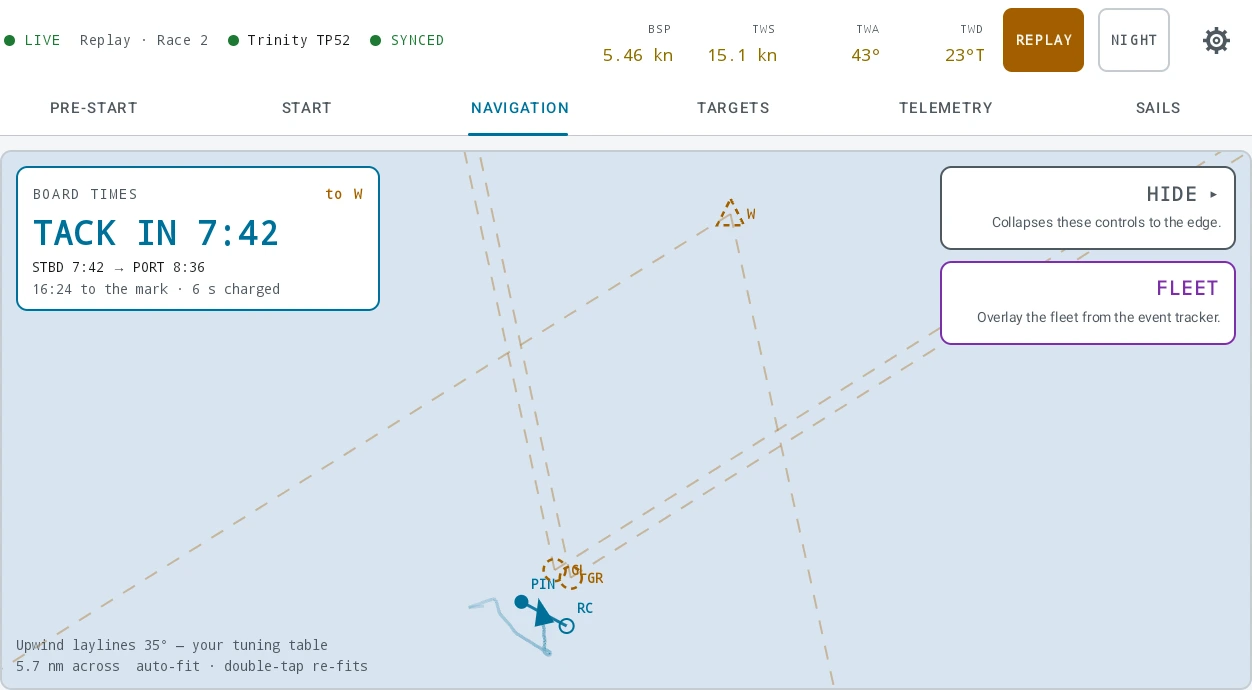
CLEAR COURSE goes back to an empty plot and asks first. It takes the confirmed marks with it, deliberately — a course the committee has re-laid is better empty than half right — and those positions cannot be recovered without sailing to them again.
The controls stack down the right-hand edge of the chart and the column scrolls when there are more of them than fit. Three is the ordinary racing column; it only grows at a rounding, and on a fleet-tracked boat.
11 The plan, changed aboard
A coastal or offshore plan is drawn ashore on a big screen, and then it meets the water. The committee shortens the course, the plan turns out to go the wrong side of a rock, a fishing fleet is working the corner somebody meant to cut. WAYPOINTS, on the NAVIGATION control column, is where you change it — and everything on it works with no signal at all, because that is the only kind of signal an offshore race has.
It opens the plan as one scrolling card: the route, then ZONES, MARGIN and LOG. SAVE TO PLAN sits at the top, and it is a button rather than something that happens by itself. An edit made on the water changes the course you are sailing and is recorded with the race; the plan on the web stays exactly as the navigator ashore left it until somebody presses that. Keeping those two apart is what makes “what we planned” and “what we sailed” comparable on Monday.
Saving with no signal
The press writes the plan to the tablet and returns. The card says Saved aboard, and that is a statement about the tablet rather than about the platform: the whole plan — route, zones, margin and log — is on disk from that moment and survives a flat battery, a reboot and the rest of the night. It goes to the web on its own the next time there is a link.
You do not have to be watching when that happens, and you cannot lose the edit by not watching. How many plans are waiting is in SETTINGS → WEATHER AND DATA → UPLINK & BUFFER, beside the telemetry queue. They drain on their own schedule, deliberately separate from the racing data: a plan the platform will not take can never hold up a gun.
When the plan changed ashore too
If somebody replaced the same plan on the web while you were out, the save does not go through and nothing of yours is lost. The card becomes one screen with both edits on it — Your edit 3h ago offline · plan changed ashore 40m ago — and three ways out. Your copy stays on the tablet until you choose one of them: no timer, no default, and the editor underneath stays shut so you cannot spend an hour working on a version you are about to discard.
| Choice | What happens |
|---|---|
| KEEP MINE | Your plan goes up over theirs, next time there is a link. It is named for what it does. |
| TAKE THEIRS | Your copy aboard is discarded and the plan from the web is loaded. The only one of the three that loses anything. |
| KEEP BOTH | Yours is saved as a new plan, <name> (aboard <date>), and theirs is left alone. The boat then follows the new one. |
There is no merge, and there should not be. Two hand-drawn courses cannot be blended into a third either navigator would recognise, and nothing on the platform can determine which is right. Somebody has to decide. It is the same clash the web shows, with one more way out — a boat at sea has a better reason than a desk does to keep both and sort it out at the dock.
ZONES: areas the routing treats as walls
A zone is an area this plan is not to be routed through: a traffic separation scheme, a mussel farm, a firing range, the corner the sailing instructions put out of bounds. ADD ZONE puts the chart into a drawing mode — every tap is a corner, the bar along the bottom counts them, UNDO takes the last one back, FINISH asks for a name and CANCEL really cancels. Three corners at least, sixty-four at most, twenty zones on one plan. The ring closes itself.
A mode rather than a drag, deliberately: a long press and a travel on a moving foredeck is one wave away from a pan, and a mode cannot half-happen. While it is on, the pan and the pinch are exactly what they were for whoever is not drawing.
The moment it is finished the routing obeys it — PATH AHEAD goes round it like a rock rather than warning about it — and the shallow shading and the leg cards follow on the next recompute. Renaming and deleting are on the row, and unlike a waypoint the last zone can go: a plan with no zones is the ordinary state.
MARGIN, and why “none” is its own button
The under-keel cushion this plan is routed with, on top of the boat’s draft: 0.0 m to 20.0 m in tenths. It belongs to the plan rather than to the boat, because the same hull sails a deep Atlantic leg at half a metre and the Solent on a spring ebb at two.
0.0 m and “none declared” are different answers, and the card keeps them apart. Zero is a navigator who has looked at the depths and wants no cushion; none is a navigator who has not looked, and the routing card tells you which of the two it is obeying. That is why NONE is a button rather than the bottom of the roller.
LOG: what somebody writes at 0300
A free-text log on the plan, saved with it and readable on the web afterwards. It is a different box from the notes the navigator wrote ashore, on purpose: the notes are the brief and this is the log, and a crew with one box overwrites one with the other — always the half written at three in the morning. It saves as you type, so there is nothing to remember to press.
Everything on this card is yours until you save it. The zones, the margin and the log change what the boat does immediately — the routing obeys a zone the moment it is drawn — and reach the web only through SAVE TO PLAN, exactly as a nudged waypoint does.
12 The fleet on the plot
Also on NAVIGATION, and only for boats carrying the fleet tracking data add-on: FLEET overlays the rest of the fleet on the same chart as your own boat, live, from the event’s official tracking. The button reads FLEET ON while it is running, and tapping it again stops. It is per boat, so a team that added it to one hull sees the button there and not on the others.
Without the add-on there is no button. Not greyed, not a padlock — absent, with no copy beside it. Every other control on that column stays put when it cannot act, because each of them explains what to do about it, and there is nothing a crew on the water can do about a boat that does not carry tracking. Setting it up is a conversation ashore and then two steps on the web: write to support@nordicstars.ai to have fleet tracking enabled for the organisation, add it to this boat’s subscription from Billing, then set the event and your bow number under Tracking data.
It also needs the boat to be live. The tablet fetches what it needs — which event, which credential, how often to ask — from the platform, and that is served only to a tablet holding the boat. From there it polls the tracking provider directly, about every two seconds, rather than through us: a tactical overlay is worth nothing a second late.
Your provider credential is the one thing in that bundle worth being careful with, so the tablet never writes it to storage. It lives in memory for as long as the app is running and no longer; what is kept is the rest — enough to know this boat has tracking, so the FLEET control does not blink in and out with the tablet’s signal.
What is actually drawn
Each rival is a marker carrying its bow number, and the bow number is the whole label — not the boat’s name. Names run to a dozen characters and more, and twelve of them on one beat is a plot of overlapping words with the boats hidden underneath.
- Your own boat is not taken from the tracker. It stays the glyph the plot already draws off your own instruments, several times a second. The provider’s copy of you is a second-hand fix from a different receiver, and two boats on one screen both claiming to be you — disagreeing by a boat length — is the worst thing this overlay could show. Your boat is left out by matching your bow number, so set it on the web when you set the event up; with none set, nobody is excluded and your tracked self will appear beside you.
- A rival with no known course is drawn as a disc rather than an arrow. The direction comes from the feed, or from the bearing between two real fixes, or from the last one it was drawn with — and when there is none of that, a disc says so. An arrow pointing north because nothing better was available is an invented number.
- Nothing is interpolated. A boat with no fix in the current frame is not drawn at all rather than guessed forward.
A tracker that dies stops talking
Staleness is counted per boat, from the tracker’s own account of when it last had data — plus how old the frame carrying it is, so a feed that fails altogether fades and clears itself with nothing else having to notice.
| Age of the last fix | What you see |
|---|---|
| Fresh | A filled marker with its bow number. |
| Past about 10 seconds | The marker goes hollow and its label dims. The boat is still where it was last measured; what has aged is the measurement. |
| Past about 30 seconds | The boat is gone from the plot, tail and all. |
Those two are the defaults and the platform sets them, so they can be retuned for a fleet without waiting for an app release. One tracker dying is one marker leaving, and says nothing about the boat beside it — a dead tracker that went on asserting a position would be most convincing exactly when it was most wrong.
A line along the bottom-left of the chart says what the overlay is doing whenever it is on:
| Note | Means |
|---|---|
| FLEET — connecting | Running, nothing has arrived yet. |
| FLEET — <race name> | Live, on the race the provider’s schedule says is on. |
| FLEET — no race live | Nothing is running at the event right now. Ordinary between races. |
| FLEET — waiting for the platform | The tablet has recorded that this boat has tracking but has not fetched the credential yet — take the boat live. |
| FLEET — tracking token refused | The provider rejected the credential. Retrying cannot fix it; it is a job for Tracking data on the web. |
| FLEET — feed unavailable | The provider is unreachable or answering badly. |
TAIL: the recent track behind each rival
TAIL appears directly under FLEET, and only while the overlay is on. It opens Fleet tails, with a length and two readings:
- TAIL LENGTH — OFF, 30 s, 1 min, 3 min or 5 min of each rival’s recent track, drawn fading from the oldest end.
- ON EACH BOAT — SOG and HEADING, independently. With both on a marker reads
7.2 kn 214°, in a block that takes the side the boat’s course leaves clear — right of a rival sailing east, left of one sailing west. A reading the feed does not carry prints nothing at all rather than a placeholder.
APPLY commits and CANCEL really cancels. The settings are kept on the tablet and survive a change of boat; the FLEET toggle itself is the opposite and starts off every time the app does, because an overlay left running from last weekend is not a decision anybody made.
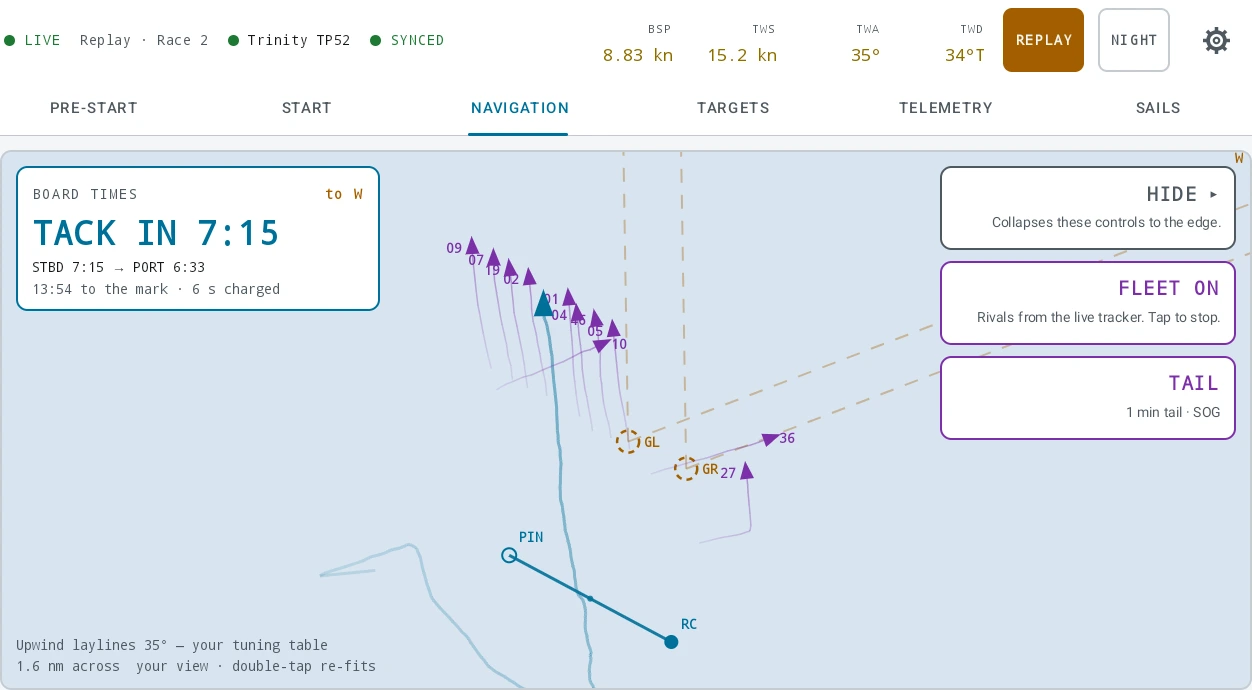
Each fix is dated by when it was taken rather than when it arrived, which buys one useful property for free: a stuck tracker adds no tail. It leaves a track that stops growing instead of one that keeps stretching from a position nobody re-measured. Lengthening the tail also works immediately — switch 30 s to 5 min and you get five minutes on the next frame, not a tail that grows into it over the following four.
Heel is not on offer, and is not pending. The fleet’s trackers report position, speed and course; nothing on them measures an angle, and rival boats do not stream their instruments to anybody. There is no greyed-out control for it because a greyed-out control is a promise, and the dialog says so in a line so that looking for it finds an answer rather than an omission. HEADING is the tracker’s course over ground for the same reason — it is not a compass reading off the rival’s instruments. Your own heel is unaffected: that comes off your own boat and is on TARGETS and TELEMETRY as always.
Ashore, the same event’s tracking feeds the debrief — the player’s Fleet track mode, Nearby Boats and the per-race Duel — off the capture the platform recorded rather than off this live poll.
13 The three tabs you live on between marks
TARGETS is your own tuning sheet, interpolated at the live true wind speed, with the upwind or downwind table picked from the boat’s angle. One tile per column of your table, under your own column names: the target is the big number and the boat’s value sits under it wearing its grade. The three-way picker lets you override AUTO to UPWIND or DOWNWIND when you want to hold a mode through a transition, and the choice is remembered per boat. A setting like A2 is shown as written and never graded.
TELEMETRY is the crew’s own instrument bank — the display bank this tablet stands in for. Press EDIT, then + ADD to pick channels out of the platform’s registry, and use the arrows to order them and the size control to make one double width. Up to twelve tiles, remembered per boat. Every edit writes through immediately, so DONE is just leaving edit mode. Because the tiles come from the live registry, a channel registered on the platform starts flowing without an app release.
SAILS is up, down, swap and docked, one tap each. + HOIST picks from the boat’s wardrobe; each flying sail gets a tile carrying the minutes it has been up and a DOWN chip; DOCKED takes everything down at once and confirms. Hoist a second sail of a kind already up and the app asks whether you are replacing it or flying both, so the log never shows two of them up together by accident. Every tap sends the complete set flying at that instant rather than a change, which is why a press somebody missed costs one boundary rather than the rest of the day. This is what fills the sails log.
14 FINISH
Back on PRE-START, a card appears once a start stands. Press the green FINISH as the boat crosses the line and confirm.
What it replaces is a guess. Without it the platform estimates where a race stopped from the data’s own cadence, and an estimate can fold the sail home into the race. The press trims the derived race to the crossing.
Afterwards the card shows the elapsed time from the gun. Only a new warning sequence re-arms it.
15 Replaying a race
The race is over and the argument starts. REPLAY plays a recorded race back on the tablet — at the dock, in the hotel, on the flight home — by substituting the recording for the boat’s own feed. Everything above that seam is the app you sailed with: the time to line, the burn, the bias, the laylines and the board times are recomputed several times a second from the recorded channels, by the same code that computed them on the water. That is why it sits in SETTINGS → WEATHER AND DATA → REPLAY rather than on a tab of its own: a replay is a document you fetch for a race while standing still, like the weather beside it.
REPLAY A RACE… opens a full screen walking the same regatta → day → race tree as the web debrief, newest first, over this boat’s own racing — sailed with the app or imported from a log. Each race says what taking it will cost: one already on the tablet is marked CACHED and needs no network at all, and one that is not downloads a few megabytes the first time. Three stay on the tablet and the least recently used drops out, so the race a crew keeps coming back to survives the next download. The card says how many are held and what they cost in disk; FORGET CACHED RACES drops them, and its confirm is the gentlest in the app on purpose — what it destroys is a copy, and the races are still on the platform.
A loaded replay puts an amber REPLAY badge and a transport bar under the status strip and outside the tabs, so no tab you switch to can be mistaken for live. On it: PLAY and PAUSE, a speed that cycles ×1, ×2, ×4 and ×8, TO START, and a scrub bar of the whole recorded window with the pre-start marked amber on it — which is where the argument usually is, and where the recording carries the full instrument rate rather than one sample a second. The clock is the boat’s own and it is labelled UTC, because the tablet is usually a long way from the venue by the time anybody replays. EXIT REPLAY is one tap and raises no dialog: nothing is lost, and coming back is the same one tap.
Scrubbing is safe in both directions. Everything on screen is worked out from where the bar is rather than accumulated as you drag, so going back past a gun un-fires it with nothing left over. The recorded presses drive the tab exactly as the crew made them, including the ones the cloud only keeps as an interval: a sequence armed for five minutes and nudged three seconds is stored as a warning and a gun 5:03 apart, and it replays as five minutes, nudged three seconds. Nothing is invented to tidy that up — a ten-minute sequence counts down from ten, and a start the committee stopped has no gun and is shown with none.
What stays live is the point of the whole thing. A replay is not a recording of a screen: every tier of TIME TO LINE, the burn, the bias and the board times are worked out again from the recorded instruments, several times a second, by the code that worked them out on the water — so what a crew reads back is what the numbers would have been, which is the only part worth arguing about afterwards. The TELEMETRY tab is the one thing a replay does not start empty: which instruments this crew likes to look at is not a fact about a day, so a replay opens on your own tiles, and any rearranging you do inside one is undone when you leave.
The course and the fleet, as they were
The course is drawn. The tablet pushes what it plots — the radio call, every mark fixed at a rounding, the gate toggle, and clearing the lot — as a whole-course snapshot rather than a running edit, so a replay draws the marks that were standing at the instant you have scrubbed to, and the laylines and board times come off them. Where a recording carries none, the plot draws none and the NAVIGATION note says which of the two it is: a race sailed before the tablet recorded courses, or a crew who cleared it. What it will still not do is fall back to the course this tablet is holding, which belongs to a different day: laylines to marks the fleet never rounded are worse than an empty plot.
FLEET replays too. The overlay is a live poll on the water, but the day’s tracking is captured, so a replay resolves every rival at the replayed instant off that capture instead — bow numbers, tails and all — and scrubbing moves the fleet with the boat. Your own boat is dropped from it, exactly as it is live, and stays the glyph the recorded instruments draw. A race the platform matched no tracking to gets no toggle at all and says so — the same answer an unlicensed organisation gets, for a different reason and by the same rule: a control for a thing that is not there is worse than nothing.
The instrument tiles are where a replay is thinner. A recording carries thirteen channels, and a free-form TELEMETRY tile outside that set reads empty rather than inventing a number. Nor are the app’s own conclusions in there — the time to line, the burn and how far under the line the boat is were never instrument readings, and they are recomputed on every scrub instead, which is the whole reason a replay is worth having.
Replay needs the organisation’s Race Control add-on and your own access — the same two things that let you sign in at all — and no live boat. The recording is served without a lease and never answers that your seats are in use, which is the whole point: a start gets reviewed when nobody is racing. The tablet still asks which boat, because the races on offer are that boat’s.
16 The settings room
The gear at the right-hand end of the status strip opens the settings room. It is one screen with a fixed list of sections down the left and the cards of the open section beside it. Five sections, in this order:
| Section | Cards in it |
|---|---|
| INSTRUMENTS | FARO, EXOCET, NMEA — one card per instrument system, input and output together — then YOUR CHANNELS and DIAGNOSE |
| BOAT | TUNING, UNITS, WIND, SAIL CROSSOVER, ROUTING LIMITS |
| WEATHER AND DATA | WEATHER, REPLAY, UPLINK & BUFFER, PRE-START HUD |
| ALARMS | ALARMS |
| SYSTEM | POWER, DIAGNOSTICS, APP SETTINGS |
Every card shows one line by default, with the rest behind a DETAILS row you open when you want it. Only explanation is folded: an error, a health note and the warnings read while something is wrong stay on the card. On INSTRUMENTS, DIAGNOSE at the foot of the pane is the pair of debugging views — FIELD MAP…, which says what each field on this boat’s feed is wired to with its live value beside it, and RAW FEED, which shows the bytes themselves.
A tablet that has never opened the room lands on INSTRUMENTS, because a tablet with no telemetry source is the one state in which this room is not optional. After that the gear opens the section you were last in. A dot appears beside ALARMS when a rule is raised, and nothing else in the room produces a badge.
Every screen the room opens — the slot list behind WHAT WE SEND…, the AIS list, the raw feed, the field map, the replay picker, the telemetry setup flow — has BACK at the top left, and it returns to the room in the section it was opened from. The same screen opened from somewhere else, such as the AIS list from the safety band, returns there instead.
What follows is the WEATHER AND DATA section, which is where the day gets to the cloud.
UPLINK & BUFFER is the full account: how many samples, batches and events are waiting, how old the oldest one is, how much has gone up, the last error in the server’s own words, and how much room is left on the tablet. On a normal day it is worth glancing at once, at the dock.
PUSH NOW flushes the current window, resets the back-off and wakes the drain. It skips no row and forgives no failure — it is impatience, not an override. With no boat taken it says so plainly rather than pretending: the queue is parked, not stuck, and nothing can leave until a boat is live.
The queue never gives up on its own. A rejection is retried exactly like a network failure and there is no attempt cap, because the failures that look permanent are the ones a human can fix.
It counts what it is about to destroy, in the confirm, and says permanently — those rows have not reached the cloud and nothing brings them back. It touches only unsent rows: nothing already acknowledged, nothing in the cloud, and telemetry keeps flowing throughout. Afterwards it reports what was actually deleted.
Reach for it when a queue is genuinely unsendable and you would rather start clean than carry it. Not when a link is merely slow — OFFLINE n on the strip is a link problem, and links come back.
SYSTEM → DIAGNOSTICS is for when a source is not behaving: what the pipeline is doing, row by row. It ships in every build.
SIGN OUT is not in the settings room. It is on the landing screen, beside SETTINGS, reached with SWITCH BOAT on the status strip — and so is the app update, because installing one is a large download and a restart, and nothing on a racing screen should be able to replace the app during a race. SYSTEM → APP SETTINGS is a signpost saying so rather than a second copy of those controls.
Signing out releases the seat and revokes the session. Anything already queued stays on the tablet and goes up when somebody signs back in and takes the boat live.
The power button
A short press on the tablet’s power button turns the screen off. It does not stop Race Control. While a boat is live the app holds three locks from Android: a wake lock, so the processor keeps running; a Wi-Fi lock, so the radio stays out of power save; and a multicast lock, so the broadcast sentences your processor puts on the network are still delivered rather than filtered out. Telemetry keeps arriving and the uplink keeps draining with the screen dark, and waking the tablet shows current numbers rather than a gap. If a reading is genuinely stale when you wake it, the status strip says so in the same way it does at any other time; there is no second indicator for having had the screen off.
Race Control asks for that exemption once, the first time a boat goes live, and Android shows its own confirmation on top of the request; the app grants nothing itself. If you answered NOT NOW, the same button is on SYSTEM → POWER in the settings room, under a line stating whether the exemption is currently in place. That line is read from Android each time the card is drawn, so it also reflects the exemption being withdrawn later in the tablet’s own settings.
KEEP SCREEN ON is the other control on that card, and it is on by default: the screen stays lit while the boat is live, so reading a number does not mean unlocking the tablet first. It follows the boat rather than the app, so a tablet left on the sign-in screen still sleeps on its own. Turn it off for a long delivery and the screen follows the tablet’s own timeout instead. It changes the screen and nothing else — the three locks are held either way, so the data is unaffected.
17 What you have on Monday
The day a tablet streams arrives in the debrief like any other import: same races, same channels, same player. It appears as one live row per boat per UTC day, created by the tablet’s first push and growing with every batch — you will see it named Race Control live in the imports list, and there is nothing to upload.
Guns, warnings, recalls, line pings, sail changes and the finish come along as events, so the player timeline is marked up before anyone touches it, and the sails log has filled itself from the water rather than from somebody’s memory.
The tablet stamps nothing with its own clock — it carries the instruments’ clock forward instead. The boat’s clock explains why, and what that means for lining a day up afterwards.