
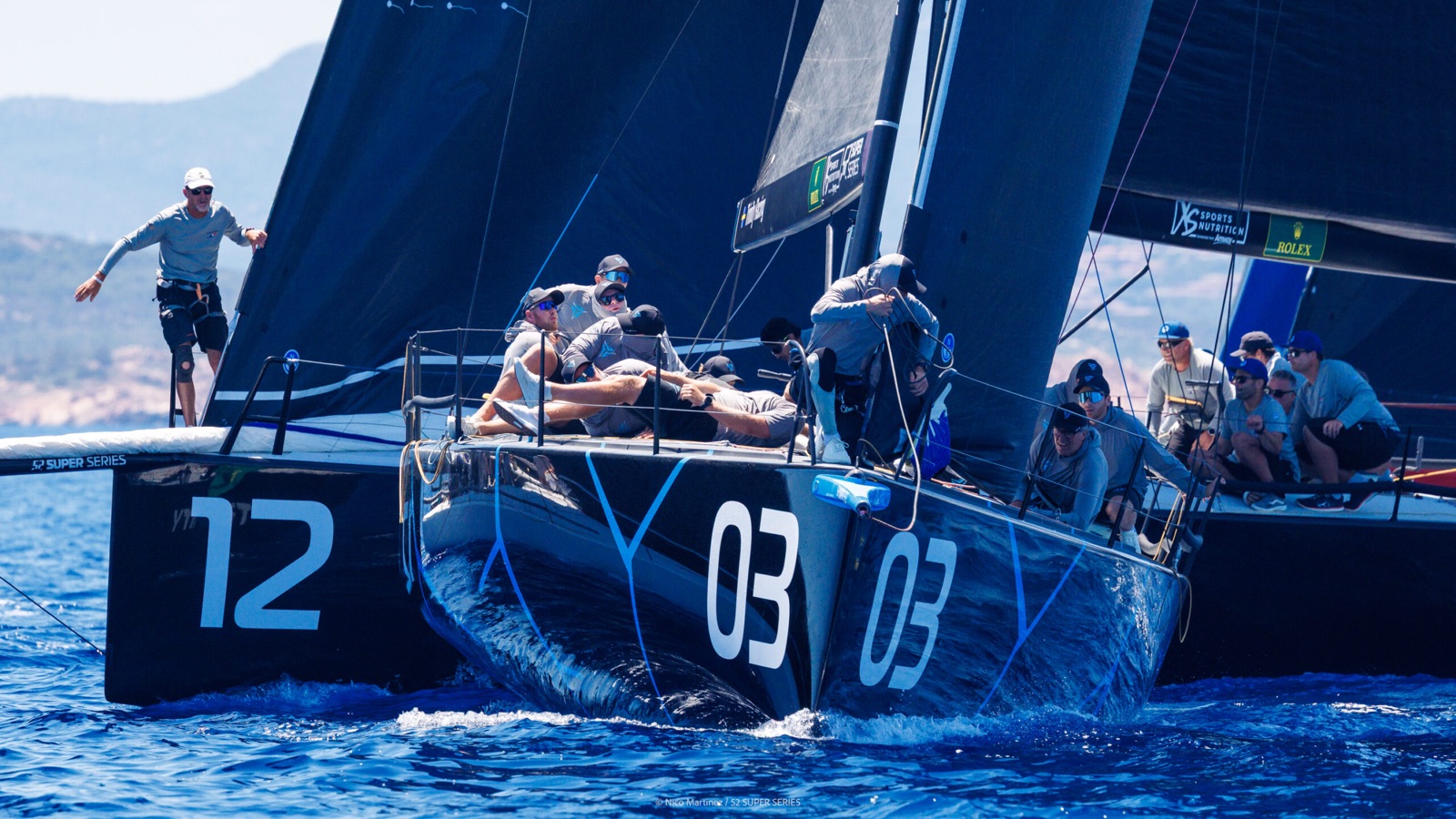
The Android app
Race Control
The line, the course and the boat’s own numbers at the helm — and the uplink that puts the day in the debrief before you tie up.
An app, not a box
Race Control is an Android app. It runs on any Android tablet used for navigation — the one already on the pedestal is the one it is for — and it takes the telemetry from the boat’s own processor, whether that is a FaRo, a B&G or anything else that streams NMEA 0183 onto the network, to work out the pre-start numbers and the navigational decisions. There is no hardware to buy from us: the boat already measures all of this, and the app is what turns it into an answer.
Every control is sized for a gloved hand on a heeling deck: buttons rather than long presses, arrows rather than drags, and a countdown that fills its card.
It reads the boat’s own instruments rather than the tablet’s GPS, and it keeps the boat’s clock: a reading that has gone quiet becomes an em dash instead of the last number that arrived.
The pre-start
This is the tab the crew works from between the dock and the gun. PIN and RC are one tap each and take the boat’s own position at the moment of the press — never the tablet’s — so a press with no fresh fix behind it is refused and says so. Once both ends are in, the buttons lock themselves, and releasing the lock allows exactly one ping at either end before it closes again. That is what stops a bag or a glove re-pinging the line at T−30.
The sequence is 3, 5 or 10 minutes, the countdown fills the card, and past the gun it counts up for two more minutes. A committee that fires a second late does not make the sequence wrong, so SYNC nudges the gun a second at a time onto the signal you actually saw — the warning already sent stays where it is, and the whole approach re-times itself around the corrected instant.
The line widget carries distance, length and bias and names the favoured end. Distance also reads in boat lengths under the metres, which is the unit a bowman calls, and it is the boat’s own length that makes it — the same number that sets how much of the boat the app allows over the line before it calls the boat over.
Time to line answers in three tiers — at current speed, at target on the same course, and the fastest sailable route with your own tack and gybe cost charged to it — and the burn on top is the seconds to kill before resuming the speed and angle that make the gun. A fourth number, SPEED, turns the question around: the most boat speed you can carry at your angle to the line and still not be early — the trimmer’s number, amber the moment you are hot. The line geometry, worked through: how distance, bias in degrees and the favoured end are computed, and why being over the line is simply the sign of the distance.
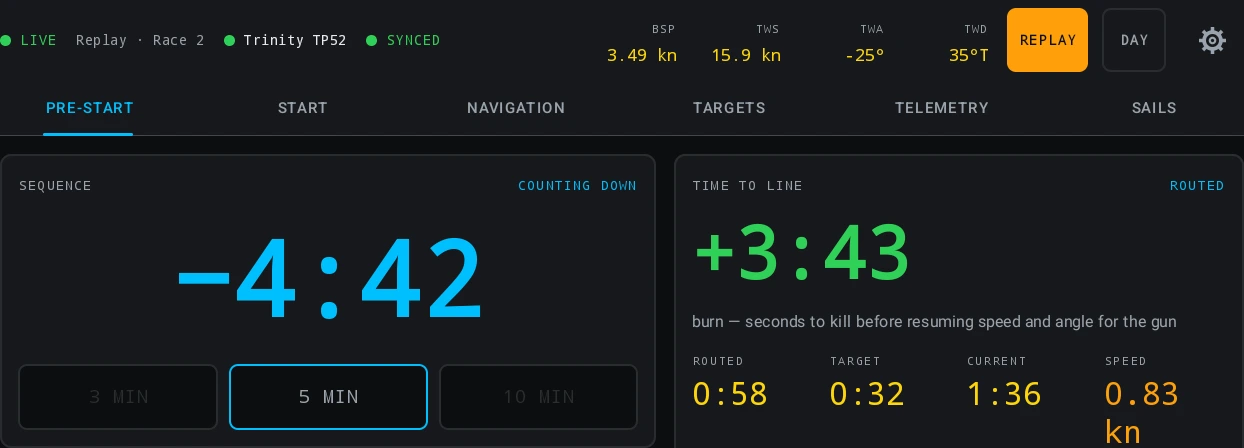
Those numbers answer to whichever end you are actually going for. AIM is AUTO, PIN or RC: on AUTO the routing picks, and choosing an end points every tier, the burn and SPEED at that end and says so in a note that stays up for the whole approach. What it does not do is go quiet about the bias — the line card goes on naming the favoured end while you aim at the other one, because a crew overriding a recommendation is owed the recommendation, not a screen that agrees with them.
A boat approaching a line is not sailing its race polar, so from the warning to the gun the tiers and the burn run off the boat’s start polar where it has one, badged on the card so nobody has to remember; the gun hands them back to the nav polar. And a PERF percentage trims the whole model to the day between 80 and 120 % — a boat that is not quite on its numbers is the ordinary case, not a fault to be argued with. It scales the target and routed tiers and nothing else: the current tier is a measurement and SPEED is geometry, and neither is ours to bend.
One red STOP covers the whole armed sequence: a postponement before the gun, a general recall after it. Both tell the platform, both void the start, and the day’s start number goes back to the committee to re-run. A small individual recall sits beside it after the gun — the race stands, and the cloud keeps the note.
The tabs
Under the status strip, left to right: PRE-START, START, NAVIGATION, PATH AHEAD, TARGETS, TELEMETRY, SAILS.
PATH AHEAD is the only tab that comes and goes. It is there while a coastal or offshore plan with a route is loaded, and absent otherwise — so a windward/leeward day has six tabs and a routed race has seven. Nothing before the gun changes with the kind of race: the pings, the sequence, the line, all four time-to-line numbers, STOP, the recalls and FINISH are the same on both.
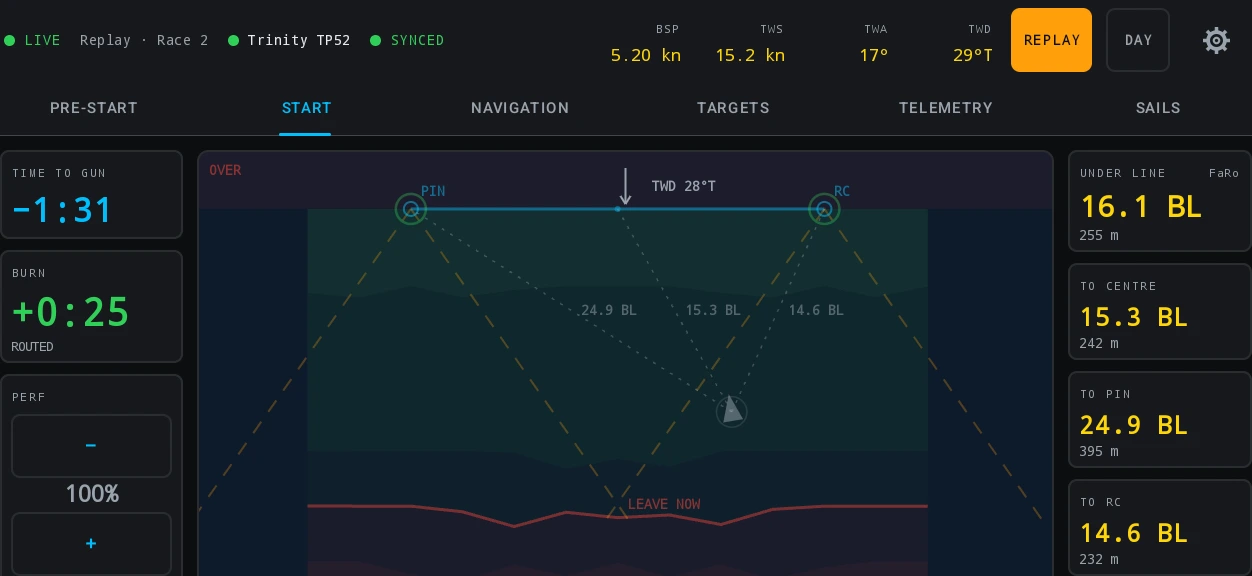
START is the last minutes on one full-screen picture: time to gun, the burn, how far under the line the bow is, the PERF scalar with a step either side, and the line itself. It carries no chart and no sea layer, and it is the tab a helm sails the approach on while somebody else works PRE-START.
On the course
The committee broadcasts the weather mark as a bearing and a distance from the middle of the line; one action lays the whole estimated course from it. GATE or NO GATE is a property of the course rather than a preference, so a windward-leeward with a gate and a single-lap course to a finish are both one toggle away — and once a gate mark has been fixed at a rounding the toggle disables itself and says why, because the boat has been there and that outranks the setting. Marks are fixed at the rounding from the boat’s own position, and an estimate draws hollow while a fixed mark draws solid — because an estimate is a radio call plotted on a flat-earth approximation and can be a hundred metres out. Laylines come off your own tuning table, then your polar. North is up and stays up.
Screen capture to come
TARGETS at a live wind with one word cell showing ungraded. Both palettes, from a tablet running 1.27.14.
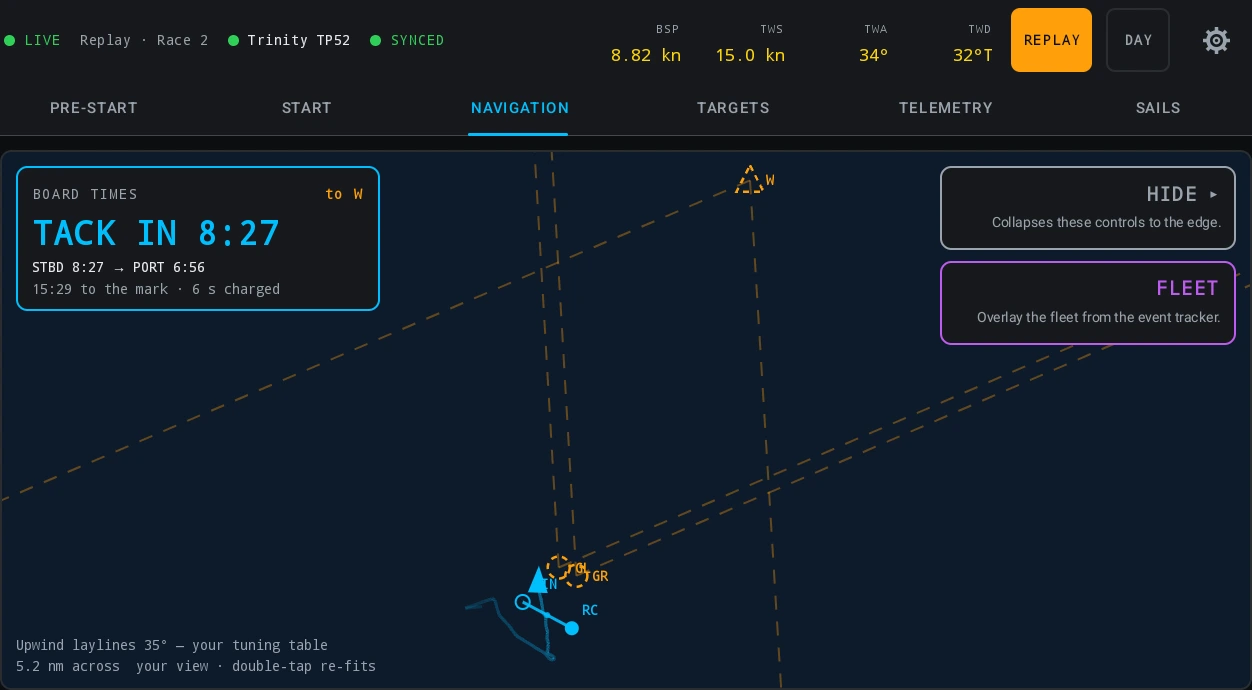
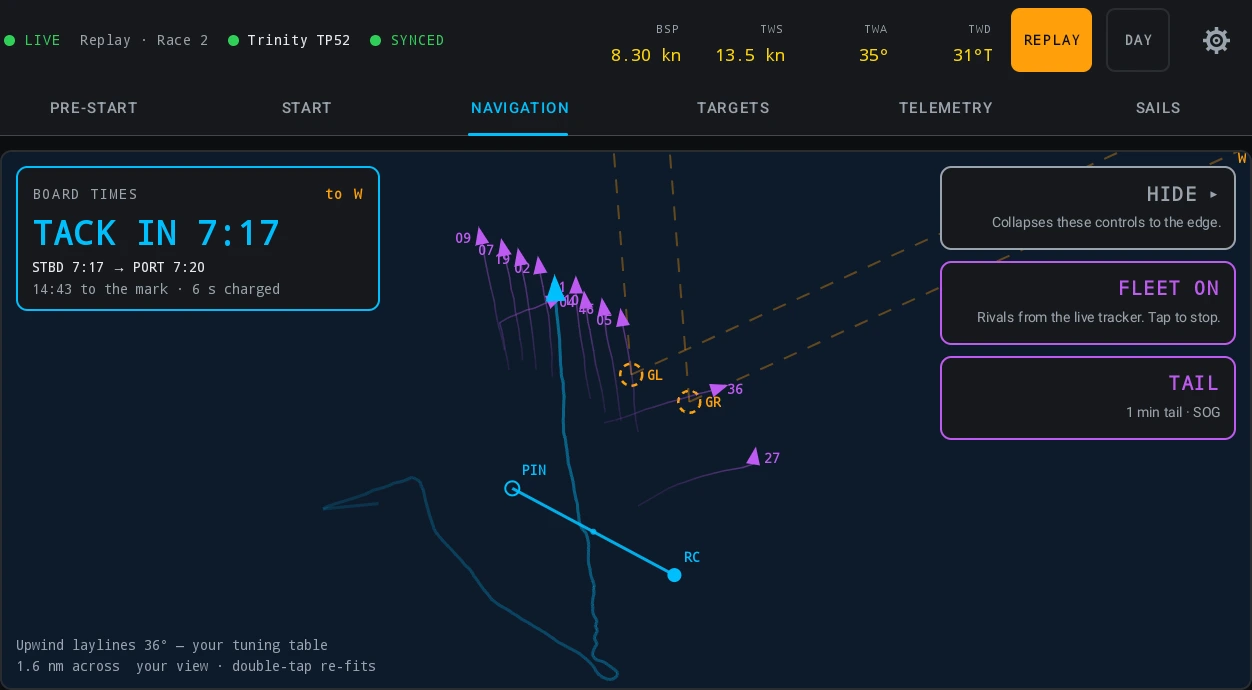
BOARD TIMES counts the time left on this board and the next, and when you have sailed past the layline it says OVERSTOOD and by how many degrees — rounded up, so it can never print a confident nought at the moment it starts to matter. Off a course with no gate it aims the pinged line instead and badges which part of it.
What a manoeuvre costs is not guessed. The app reads Expedition’s own CAL tables off the boat — acceleration in knots per minute over wind angle and wind speed, rate of turn in degrees per second over boat speed, and braking in seconds to stop over rate of turn — and charges every routed path the turn time plus the speed it costs to get back up. The units are Expedition’s, verbatim; converting them would make every future disagreement two-sided. Where the tables are uploaded.
The braking table pays for one thing more, and it is an advisory rather than an input: while a sequence is armed the card can carry KILL and a distance — the distance it takes to stop the boat from its current speed. It never enters the burn arithmetic. It is there because the burn answers in seconds, and a helm coming into a crowded line needs the answer in metres.
TARGETS is the boat’s own tuning table, interpolated at the live true wind speed, with the upwind or downwind table picked from the boat’s angle. One tile per column, in the table’s own order and under the crew’s own column names: the target is the large number and the boat’s value sits under it with its grade. A setting like A2 or Max is shown as written and never graded — a named sail has no deviation to measure. Its own COURSE PERF percentage trims the course targets the way PERF trims the approach, and the two are separate on purpose: a day can be a hundred per cent upwind and not in the last three minutes before a gun.
Two polars, and the app labels which is which. The start polar drives the approach and the nav polar drives the laylines, the boards and the targets. The third role, perf, is the platform’s yardstick for percentage-of-target in the debrief and the tablet never reads it at all.
The app draws itself in two palettes, DAY and NIGHT, swapped from the status strip. It is the one preference held by the tablet rather than by the boat, because it is a statement about the light rather than about the sailing. It starts on NIGHT, because a day palette after dark is bright enough to spoil night vision in the cockpit, and the cost of the wrong palette in daylight is only that the screen is harder to read.
At an event with official tracking, FLEET puts the rest of the fleet on that same chart, live, each boat carrying its bow number — and TAIL draws where each of them has just come from, at 30 seconds, one, three or five minutes, with speed and course over ground beside the marker if you want them and neither by default. A tracker that stops reporting fades and then leaves, tail and all, rather than going on asserting a position it can no longer measure. Your own boat is never taken from the tracker: it stays the glyph your own instruments draw. Needs the fleet tracking data add-on, and without it there is no control on the screen at all.
TELEMETRY is the crew’s own instrument bank, the display bank this tablet stands in for. Tiles are picked out of the platform’s channel registry — badged live or quiet against the feed — in two sizes, in the order you want them, remembered per boat.
SAILS is up, down, swap and docked, one tap each. Every tap sends the complete set that is flying at that instant, so a dropped press costs one boundary rather than the rest of the day. Those taps fill the boat’s sails log, so nobody has to reconstruct the weekend from memory afterwards.
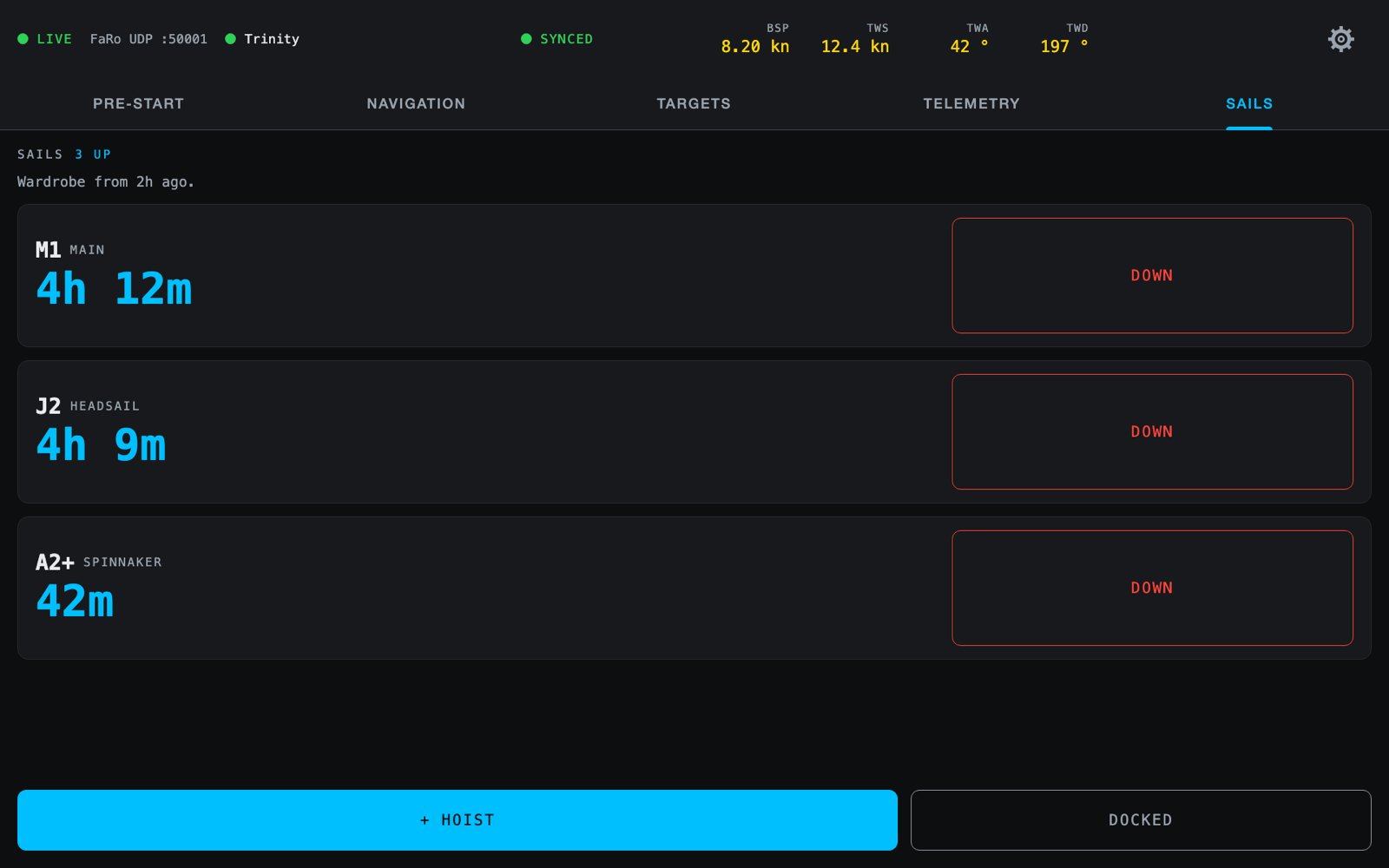
Under the sail tiles sits the boat’s own crossover chart: a table of true wind speed across and true wind angle down, each cell naming the main and the sail in front of it. The filled cell is the boat, at the wind the instruments are reading, so the card says Chart says M1 + J3, or Flying A2 — the chart agrees, and names the nearest change on either side: M1 + J3 above 12 kn. When what is logged and what the chart calls for differ, the line goes amber — it is a statement rather than an instruction, because the tablet does not know the kite is shredded or that the next mark is two miles away. There is no control on the card; the ranges are entered at a dock, in SETTINGS → BOAT → SAIL CROSSOVER.
The chart is built from wind-speed and wind-angle ranges somebody typed in, one pair per sail. Nothing here is measured, and the chart does not change boat speed. The platform’s sail log and its per-sail performance pages are a separate thing, and this chart never reads them.
Screen capture to come
SAILS with three sails up and the CROSSOVER CHART card visible, in both palettes, from a tablet running 1.26.1.
FINISH is one press at the crossing, and the derived race is trimmed to it. Without it, the platform estimates the end from the data’s cadence — and an estimate can fold the sail back to the dock into the race. The press is the whole input, it is confirmed once because it cannot be taken back, and the earliest valid press wins.
The uplink, and what happens in a dead spot
Source, cache, queue, cloud. The app parses the boat’s feed, keeps the latest value per channel, writes five-second windows to disk and drains them oldest-first. Nothing on the boat is lost to a dead spot: it buffers on the tablet and drains in order when the link comes back. The status strip says which of four things is true — NO LEASE, SYNCED, BUFFERING n, OFFLINE n. Buffering means the queue is filling and the link is fine; offline means the posts are failing. Both keep the data, and a drained buffer overlapping what was already sent comes back as duplicates rather than as an error.
Channel names are checked against the platform’s live registry before a batch goes up, which is the same reason a channel registered on the platform starts flowing without an app release. Telemetry comes in over FaRo UDP or NMEA 0183 (TCP or UDP), set per boat with its port — the same tablet sails a FaRo-equipped boat one weekend and a gateway boat the next.
Coastal and offshore
A coastal or offshore race is not sailed off a radio call, so it is not laid from one. The course is a race plan drawn ashore in the web app — waypoints in order, which side to leave each one, a passing radius, the water the routing must not enter, and the depth you want under the keel. LOAD RACE on NAVIGATION takes it off the tablet’s own cache, so it loads with no signal at all.
With a route loaded, NAVIGATION swaps the mark-laying controls for the route ones — SKIP, BACK and WAYPOINTS — and the corner of the plot swaps board times for six labelled numbers: DTW, BTW, XTE, VMC, TTG, DTF. The route advances itself when the boat is inside the waypoint’s passing radius or past the perpendicular through it, by one waypoint and never by two, and it never overrules a SKIP or a BACK.
PATH AHEAD then routes the rest of the course from where the boat is, through the forecast the tablet holds, against the depth in the sea model and around the plan’s own exclusion zones. Each leg card gives the board it is entered on, the heading to steer, the arrival time in UTC, how long on this board, how many boards, and the sail pair the boat’s crossover chart calls for — with an amber line at each change. Where the depth could not be checked it says which part of the leg, rather than passing it in silence.
Wind limits and motoring are off until you turn them on, in SETTINGS → BOAT → ROUTING LIMITS: a maximum and a minimum true wind speed, and an engine speed the router may use below the minimum. Motoring never opens the no-go zone — a beat under engine is still sailed in boards — and a boat that does not allow it gets no motoring line at all.
The plan can be changed aboard with no signal. Drag a waypoint on the chart, add or delete one, draw a keep-out zone, set the margin, and write the navigator’s log. SAVE TO PLAN writes to the tablet and sends when there is a link; if the plan also changed ashore, the tablet offers three answers rather than merging — KEEP MINE, TAKE THEIRS, KEEP BOTH.
A computed route is a planning result, not a passage plan. It follows the forecast in one file and the depth in one sea model, both of which can be wrong or incomplete, and the ship’s plotter stays the navigator’s authority. The chart under the course is the platform’s own derived chart, which is global, or an official vector chart where the tablet has one — today that is the United States, because NOAA publishes its cells for redistribution and European offices license theirs. The tablet always says which of the two you are looking at, and says no official chart for this area when it has looked and there is none. What it carries is a repacked corridor extract: it is not an official ENC, it does not meet chart carriage regulations, and its symbols are a racing subset rather than a conformant S-52 presentation. Navigation sets the three chart tiers out in full.
The water, the ships and the crew
Seven alarms, and the set is closed on purpose: depth, cross-track error, arrival, anchor watch, closest point of approach, man overboard, and the instruments going quiet. Every one is a fact the tablet can establish from the boat’s own instruments and the loaded plan, against a number you set — so every one still works with no signal, in the dark. Six ship armed; the anchor watch ships disarmed, because there is nowhere to watch until somebody drops one.
AIS arrives on the same NMEA 0183 feed as everything else. The target list ranks by threat rather than by range — guard-zone hits first, then closest point of approach — and puts distress beacons above everything. CPA and TCPA are computed on present course and speed and project no turn, and TCPA is signed, so a target already past reads as past. Where a beacon’s status field and its name disagree about live-versus-test, the tablet reads it as live.
MOB is a red button on the status strip, on screen on every tab and over the settings room. A one-second hold raises the alarm, with no confirmation dialog, and the mark is written to disk before anything else happens; a tap opens a panel with the alarm state and the beacons heard, and raises nothing. A hold with no position still drops a mark and says the position was not recorded. A second hold does not move the first mark. Clearing it takes two presses. The alarm is also raised by a $--MOB sentence on an NMEA 0183 feed or by an Exocet’s MOB box, and a hold is sent out as Expedition’s MOB mark and as a start command for the Exocet’s MOB box. Every man overboard is recorded for the debrief, with its source and position; the platform notifies nobody.
The tablet can also put numbers back on the boat. Instrument output transmits the app’s own values — time to gun, time to burn, distance to the line, line bias, laylines, targets — to an NMEA 2000 gateway, so a mast display can carry them. It never transmits wind or boat speed: those are the instruments’ own and the app is not a second opinion about them. None of this has been checked against a physical display yet, and the app says so where you configure it.
Units are the tablet’s, not the boat’s: depth in metres, feet or fathoms; temperature in °C or °F; positions in three spellings; bearings true or magnetic; clocks UTC or local. Speed is always knots, because every polar, target table and instrument on a racing yacht is in knots. A bearing wears a T or an M so the choice is never something to remember being in, and what does not move with it is laylines, target angles, tacking angles and leg times — an angle between the boat and the wind does not care which north it is measured from.
Magnetic variation is computed on board from the World Magnetic Model 2025, from the boat’s own position and today’s date, with nothing downloaded and no signal needed. It is the main field only: the model’s own declination error is about a degree, worst near the poles, and it says nothing about the crustal field or a magnetic storm. It is valid to the end of 2029, and past that the tablet still computes a variation and says on the UNITS card that the model has expired. With no position at all there is no variation to compute, so the tablet prints the true bearing and labels it rather than guessing one.
After the race
The day is already in the debrief by the time you tie up, and the course you sailed is in there with it: the tablet pushes the whole course whenever it changes — the radio call, every mark fixed at a rounding, the gate toggle, clearing it — as a snapshot rather than a running edit, so what the platform holds is always a course that existed rather than a sum of changes.
REPLAY then plays a recorded race back on the tablet by substituting the recording for the boat’s own feed — so the screens are the ones the crew sailed with, and the time to line, the burn, the bias, the laylines and the board times are recomputed from the recorded channels rather than played back as pictures. That is the only reason to review a start at all: not what the tablet said at the time, but what it would have said. Pick the race by regatta, day and race; play, pause, run at up to eight times, and scrub — with the pre-start marked on the bar, and an amber REPLAY badge above every tab so the screen is never mistakable for live.
The course is drawn as it stood at the instant you have scrubbed to, and so is the fleet: rivals move around the replayed boat at the moment being replayed, tails and all, off the tracking the platform captured that day rather than off any live poll. Where a recording carries no course the plot draws none and says so, and the app will not fall back to the course it is holding today — that one belongs to a different day, and a layline to a mark the fleet never rounded is a wrong answer rather than a missing one.
A replay sends nothing, and cannot. No telemetry, no pings, no gun, no finish — the controls that would emit one are not on the screen at all while a recording is loaded, so a rehearsal gun cannot become a real gun on a real day. It needs the Race Control add-on and your own access — and no live boat at all: a replay is served without a lease, so reviewing yesterday’s start never costs a seat somebody is racing on today.
It tells the truth
Every number on the screen is attached to a reading taken at a moment, and the app makes that visible rather than smoothing it away. A value that is getting old fades before it goes. A reading that has stopped arriving becomes an em dash, not the last number that arrived. A ping over ten minutes old goes amber, because the committee may still have been laying the line when it was taken.
Where the app cannot do a thing, the control is absent rather than disabled. There is no fleet toggle without the tracking add-on, no gate toggle once the gate has been rounded, no boat-lengths readout without a length to divide by, and nothing that emits an event anywhere on a loaded replay. A greyed-out button still invites a press; a missing one has already answered.
The same rule runs through the replay. The instrument tiles show the channels the recording actually carries and read empty for the rest rather than filling in. The app’s own conclusions are never served back and stored — the burn and the time to line are worked out again from the recorded instruments every time you scrub, which is what makes them worth arguing about.
On your tablet
There is no app store listing, and there is nothing to wait for either. Sign in to Nordic Stars in the tablet’s own browser, open the Overview page, and the app is a download on it — which is the flow that suits where it actually happens: on the boat, between races, with the tablet in your hands and nothing else to hand. Later versions install over the top of the one that is there, so an update is the same press and keeps the boat’s settings. Android asks once, the first time, for permission to install from the browser.
You are not asked for what the app can find out for itself. Take a boat that has never been set up and SET UP TELEMETRY comes up on its own: it listens to the boat’s own network for a few seconds and offers what it heard, naming the sentences it can read and the ones it cannot. Nothing is ever sent to your instruments while it listens. Transmitting is a separate setting — instrument output, above — and it is off until somebody turns it on. Where a gateway serves a stream rather than broadcasting, one address gets asked instead — and where the network is quiet, the answer is four things to check rather than a shrug.
Everything else stays on the web where it already is — boats, crew, targets, polars and the wardrobe. The step-by-step, licence to first gun, is Race Control on the boat.
The settings room, in five sections
SETTINGS is a rail of five sections rather than one scrolling column, and every path printed anywhere on this site is spelled against it:
- INSTRUMENTS — one card per instrument system, each holding that system’s input and, where it has one, its output: FARO, EXOCET, NMEA. Then YOUR CHANNELS and DIAGNOSE.
- BOAT — TUNING, UNITS, WIND, SAIL CROSSOVER, ROUTING LIMITS.
- WEATHER AND DATA — WEATHER, REPLAY, UPLINK & BUFFER, PRE-START HUD.
- ALARMS — one card, and a section of its own.
- SYSTEM — DIAGNOSTICS, and the signpost to the tablet’s own app settings.
A crew who has never opened the room lands on INSTRUMENTS, because the first thing a tablet needs on a new boat is a telemetry source, and a tablet with no source is the one state in which the room is not optional. Every card is at most one scroll from the top of its own pane, and every card shows one line by default with the rest behind a DETAILS row.
Screen capture to come
SETTINGS on the BOAT section, so the five-section rail is on the record. Both palettes, from a tablet running 1.26.1.
Seats, access and signing in
A seat licenses a boat, not a tablet. The first device aboard claims the boat and every other tablet on it joins for free.
Seats limit how many boats can run Race Control at once — not how many people. Every tablet aboard a boat that is already live joins it for free, so grant access to the whole crew.
Access is the other axis, and it is per person: your admins grant and revoke it in organisation settings, and granting it costs no seat. The two are independent, so a licensed team whose newest trimmer has no access yet is an ordinary state and one toggle fixes it.
Signing in gives the tablet a 7-day device session, so most mornings start with no sign-in at all. When the week is up the app asks once and carries on.
Race Control is added to a boat’s own subscription at 30% of that boat’s coverage price, on the same subscription, renewing and cancelling with it. Tick it at checkout, or add it to a subscription already running from the Billing page, which shows the exact amount for your boat first. It comes with monthly and yearly coverage, a day pass does not carry it, and it is not offered on every class. See pricing for the per-boat passes the rest of the platform runs on, or write to us for a fleet-wide arrangement.
What it does not do
- No hardware is sold and there is no app store listing. The app is a download from your own Overview page, sideloaded onto a tablet the boat already navigates with.
- A replay sends nothing, and the controls that would emit an event are absent from the screen while a recording is loaded.
- No fleet overlay without the tracking add-on — and with it, a rival carries a bow number and no angle, because the trackers measure position, speed and course.
- Instrument output has never been seen on hardware. It is opt-in, it is off until somebody turns it on, and the app says so where you configure it. One of the four slot transports is stored and transmits nothing; the other three transmit what their slots are set to. That limit is named, by name, in the Navigation guide and on Navigation, beside the document that configures them.
- The sail crossover chart and the routing limits do not sync. Both are this tablet’s, per boat; a second tablet aboard keeps its own copy, and the browser’s routing engine reads neither the wind gates nor motoring. Both are named gaps rather than oversights.
- Routing limits are not a weather warning and not a rule check. The tablet does not know which race you are sailing or what its sailing instructions say about propulsion. A maximum refuses a routed step; it does not tell you the weather is dangerous.
Common questions
What hardware do I need?
Any Android tablet used for navigation, and instruments that put FaRo UDP or NMEA 0183 on the boat’s own network. Nothing is sold with the app and no device is named as a requirement.
How is the start line measured?
The crew pings each end with one tap, and the app takes the boat’s own position at the moment of the press rather than the tablet’s. The line card then carries distance, length and bias in degrees, and names the favoured end.
What is the burn?
The seconds to kill before resuming the speed and angle that make the gun. Time to line answers in three tiers — at current speed, at target on the same course, and the fastest sailable route with your own tack and gybe cost charged to it — and the burn sits on top of them.
What happens when the mobile signal drops?
Nothing is lost. The uplink buffers five-second windows on the tablet and drains them oldest-first when the link comes back, and every alarm, the line and the course go on working with no signal at all.
How is it licensed?
As an add-on to a boat’s own subscription, at 30% of that boat’s coverage price. A seat licenses a boat rather than a tablet, so every tablet aboard a boat that is already live joins it at no extra cost.
Where to read more
- Race Control on the boat — Licence to first gun: access and seats, signing in, the setup flow that finds the boat’s telemetry itself, the strip’s four states, the pre-start walk, the course, the live fleet overlay, the tabs, FINISH — and replaying the start afterwards.
- Running a windward/leeward race day — A day whose course arrives over the radio, in order: the polar roles, targets, sails and instrument mapping to set up first, the tablet at the dock, pinging the line and reading the approach, the course laid from one radio call, laylines and board times, the second and third races, FINISH — and what is in the debrief afterwards.
- AIS, alarms and man overboard — The ships around you and the water under you: reading the target list and its CPA, the seven alarms and where to set each one — and the man-overboard button: the one-second hold that raises it, what it records, why clearing it takes two presses, and man overboard from and to the boat’s instruments.
- The sails log — Setting up the wardrobe, letting the tablet fill the log, typing in what it did not record, correcting rows, and reading the two analysis panels.
- The start line — The geometry both the tablet and the debrief run: distance to the line, line bias in degrees, the favoured end, and what makes a boat over early.
- Time to the line — The pre-start card’s four answers: three tiers of time to the line, the speed that puts you there on the gun, and what the gaps between them are telling you.
- Laylines and board times — Where the tacking angle comes from and how long to hold this board: the source chain behind a layline, the two-board solve, and which mark the plan is aimed at.
- The boat’s clock — Why the tablet stamps nothing: the instruments’ clock carried forward as an offset, freshness judged source against source, and the one question the tablet does answer.
The rest of the platform
The plan the tablet loads is drawn in Navigation, and the day the uplink streams lands in the Debrief Player.
Put Race Control on your boats.
It is added to a boat’s own subscription at 30% of that boat’s coverage price — tick it at checkout, or add it to a subscription already running. Then the app is a download on the tablet you already navigate with.