
1 Ashore: what the boat needs first
Four of these are per boat and are done once. The fifth is per person.
The boat
Add it under Boats. The class fixes the price band and cannot be changed afterwards. Two dimensions matter on a race day:
- LOA — the length. It is what turns the distance to the line into boat lengths under the metres, which is the unit a bowman calls, and it is the margin the tablet allows over the line before it says OVER. With no length there is no boat-lengths readout at all; the control is absent rather than blank.
- Draft — not used on this kind of day. It is the depth constraint the offshore routing reads.
The polar, in two roles
Upload it under Boats → Polar. The page has three tabs and a windward/leeward day uses two of them.
| Role | What reads it |
|---|---|
| Nav | The laylines, the board times and the target column on TARGETS. It is also what an omitted role means, so a boat with one polar has a nav polar. |
| Start | The time-to-line tiers and the burn, from the warning to the gun. A boat approaching a line is not sailing its race polar. If there is no start polar the tablet uses nav and says so on the card. |
| Perf | The yardstick percent-of-target is measured against in the debrief. The tablet never reads it. With no perf polar the platform measures against nav. |
Uploading a polar is not the same as measuring one. Polars and targets has the formats, the tabs and what each role changes.
The tuning targets
Boats → Targets, one table per mode — upwind and downwind. The columns are whatever your team calls them, and a cell may be a word (A2, Max) as easily as a number. Import the team’s CSV rather than retyping it.
Only five column names are wired to an instrument. Each column head carries a permanent chip saying whether it is compared against a live channel or is target-only, so a column called bs cannot quietly lose its comparison. A target-only column still appears on the tablet — it shows the setting to use and is never graded, because a rig setting has no deviation to measure.
The sails
Boats → Sails. Enter the wardrobe — every sail the boat owns, retired ones included. The crew’s taps on the water can only name a sail that is in it.
The instrument mapping
A channel the platform does not recognise is not stored. Two screens decide that, and both are read before a batch goes up:
- Channels — the platform’s standard registry, plus your organisation’s own
custom:channels. - Boats → Deck channels — the live field map for this hull: which name on the boat’s own feed is which platform channel. Channel mapping is the whole subject, including the correction you only make once.
A channel registered on the platform starts flowing without an app release, because the tablet checks names against the live registry rather than against a list compiled into it.
Access, per person
Race Control access is granted per user in organisation settings, and granting it costs no seat. A seat licenses a boat, not a tablet: the first device aboard claims the boat and every other tablet on it joins for free. Grant access to the whole crew.
2 At the dock: the tablet
- Sign in. The tablet gets a 7-day device session, so most mornings start with no sign-in at all.
- Pick the boat and press GO LIVE. That claims the seat. Until it is claimed the status strip reads
NO LEASEand nothing leaves the tablet. - On a boat that has never had a telemetry source, SET UP TELEMETRY comes up by itself. It listens on the two standard ports and offers what it heard. It never scans the network and never transmits.
- Check the four readings on the status strip — BSP, TWS, TWA, TWD. A reading that has gone quiet is an em dash, not the last number that arrived.
Two settings are worth a look before you leave the pontoon, both in SETTINGS → BOAT:
- TUNING — the tack and gybe costs the routed time-to-line tier charges. They are stored on the tablet.
- UNITS — depth, temperature, position format, bearings true or magnetic, and clocks UTC or local. These follow the tablet rather than the boat. Speed is always knots.
The app starts on the NIGHT palette. Swap it from the status strip. It is the one preference held by the tablet rather than by the boat, because it depends on the light, not on the boat.
3 PRE-START: ping the ends
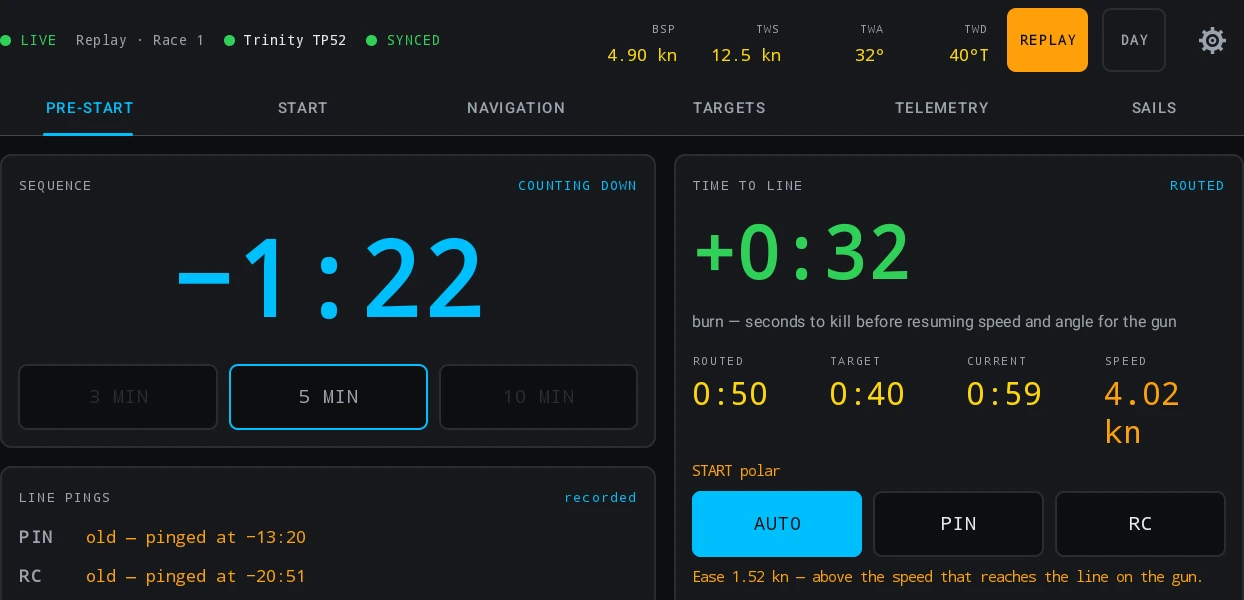
Sail to each end of the line and press its button — PIN and RC, one tap each. Under each button the app says whether that end is pinged and how old the ping is.
The position comes off the boat’s own instruments at the moment of the press, never off the tablet’s GPS. A press with no fresh fix behind it is refused and says so.
Once both ends are in, the buttons lock. The lock toggle above them allows exactly one ping and re-locks the moment either end is taken — which is what stops a bag or a glove re-pinging the line at T−30. Re-ping freely when the committee moves an end: the platform uses the most recent ping at or before the moment being asked about, so the debrief still replays the start against the line as it stood at the gun.
A ping over ten minutes old goes amber. The committee may still have been laying the line when it was taken.
4 Arm the sequence
Pick 3 MIN, 5 MIN or 10 MIN to match the committee, and press START on the warning signal. The countdown fills the card and counts up for two minutes past the gun. START leaves the card the moment the sequence is armed and STOP takes its place; there is deliberately no cancel.
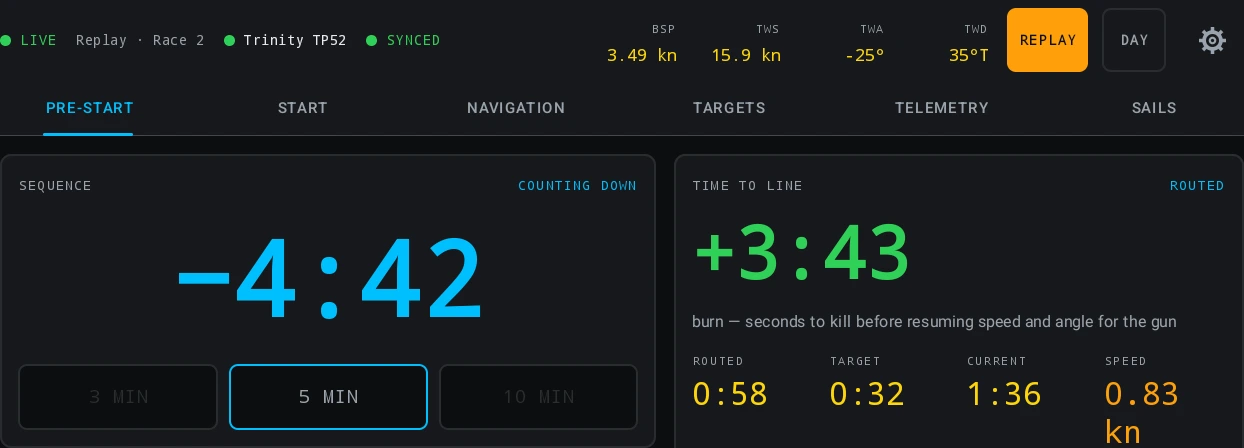
SYNC nudges the gun one second at a time onto the signal you actually saw. It moves the gun and never the warning, it is refused after the gun, and it is clamped at ±60 seconds — the window the platform matches a gun in. The whole approach re-times itself around the corrected instant.
Under the sequence the card counts the day: Start 2 today. It counts starts that stood, so a stopped start does not spend a number.
5 Read the line
The LINE card carries three numbers and names the favoured end, or says the line is square.
| Cell | What it is |
|---|---|
| DIST | The perpendicular distance from the bow to the line, with the boat’s own length under it in lengths. It carries a source badge: pings when it is computed from the fix and the two pinged ends, FaRo when the boat’s own processor publishes the number. |
| LENGTH | The distance between the two pings. |
| BIAS | How far the line is off square to the true wind, in degrees, and which end that favours. |
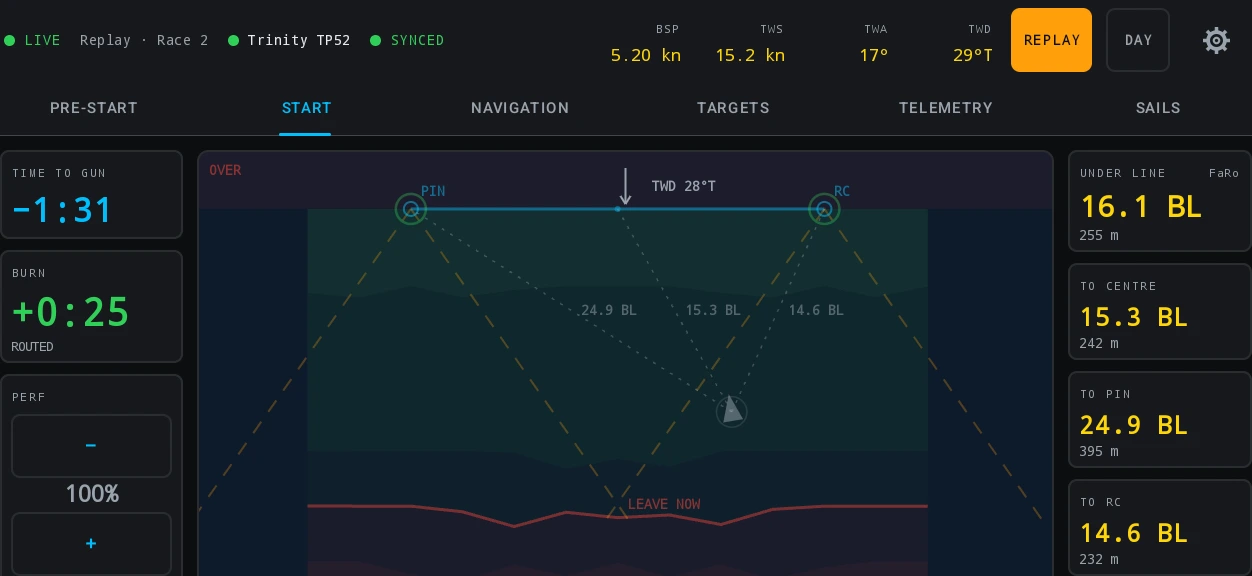
Over the line, DIST reads OVER and how far back you have to come. Being over is not a separate calculation — it is the sign of the distance you were already being shown, which is why the readout cannot disagree with itself. It is judged on the box rather than on the plane of the line, so a boat beyond the pin on the line’s extension is not called over.
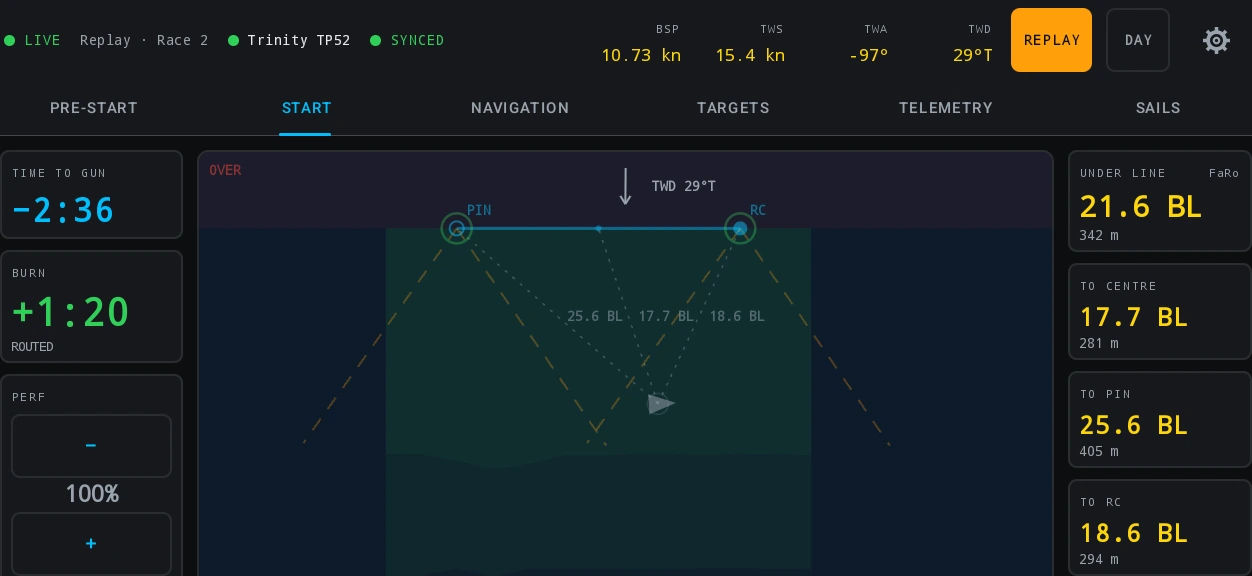
This is geometry and never a ruling. Whether a boat was on the course side at the start is the race committee’s, and nothing here is evidence in a protest. The start line works the geometry through.
6 Read the approach
TIME TO LINE answers four ways at once, and the badge on the card names which tier is talking.
| Cell | Computed from |
|---|---|
| CURRENT | The speed the boat is doing, on the course it is doing. A measurement, and the one number PERF never touches. |
| TARGET | Target speed on the same course, from the start polar at the live wind. |
| ROUTED | The fastest sailable route to the line, with your own tack and gybe costs charged to it. |
| SPEED | The other unknown, in knots: the most boat speed you can carry at this angle and still not be early. A ceiling rather than a target, and amber the moment you are over it. |
The large number on top is the burn: the seconds to kill before resuming the speed and angle that make the gun. Time to the line explains what the gaps between the tiers are telling you.
AIM is AUTO, PIN or RC. On AUTO the routing picks the end. Choosing one points every tier, the burn and SPEED at that end and says so for the whole approach — and the line card goes on naming the favoured end while you aim at the other one, because a crew overriding a recommendation is owed the recommendation.
PERF trims the model to the day, between 80 and 120 %. It scales the target and routed tiers and nothing else. A boat that is not quite on its numbers is the ordinary case rather than a fault to be argued with.
While a sequence is armed the card can carry an amber KILL and a distance: the water it takes to stop the boat from its current speed, read off the boat’s own braking table. It is an advisory and never enters the burn arithmetic. The burn answers in seconds, and a helm coming into a crowded line needs the answer in metres.
The START tab is the same last minutes as one full-screen picture: time to gun, the burn, how far under the line the bow is, PERF with a step either side, and the line. It carries no chart. One person can work PRE-START while the helm sails off START.
7 STOP, and the two kinds of recall
One red STOP covers the whole armed sequence: a postponement before the gun and a general recall after it. Both mean the same thing to the platform — this start will not count as a race — and it asks before it acts.
Then it asks a second question: keep the pinged line, or clear it? Keep it for an ordinary re-start, which is almost always. Clear it when the committee has moved the line. Either way the cloud keeps every ping.
INDIVIDUAL RECALL sits beside STOP after the gun and is a different act: the race stands and the cloud keeps the note. One tap, no dialog — it is not destructive and the moment matters.
STOP is available from the warning press until two minutes past the gun, then it leaves the card.
8 The course, from one radio call
On NAVIGATION, press SET RADIO COURSE and enter the weather mark as the committee broadcast it — a bearing and a distance from the middle of the line. One action lays the whole estimated course from it.
- GATE or NO GATE is part of the radio call rather than a preference, so a windward/leeward with a gate and a single lap to a finish are one toggle apart. Once a gate mark has been fixed at a rounding the toggle disables itself and says why: the boat has been there, and that outranks the setting.
- + OFFSET and + SAFETY add those marks once a weather mark exists.
- MARK POSITIONS types a position in directly, for a mark whose coordinates the committee published.
An estimate draws hollow and a fixed mark draws solid. The radio call is plotted on a flat-earth approximation and can be a hundred metres out. Fix each mark at the rounding, from the boat’s own position — the tablet asks Set weather mark to boat position? and you confirm. Re-fix it every lap if you like: marks drag, and committees move them.
Laylines come off your tuning table first and your nav polar second. North is up and stays up.
BOARD TIMES in the corner of the plot counts the time left on this board and on the next, badged with what it is aiming at — to LINE, to RC or to PIN on a course with no gate. Past the layline it reads OVERSTOOD and by how many degrees, rounded up, so it can never print a confident nought at the moment it starts to matter. Laylines and board times has the geometry.
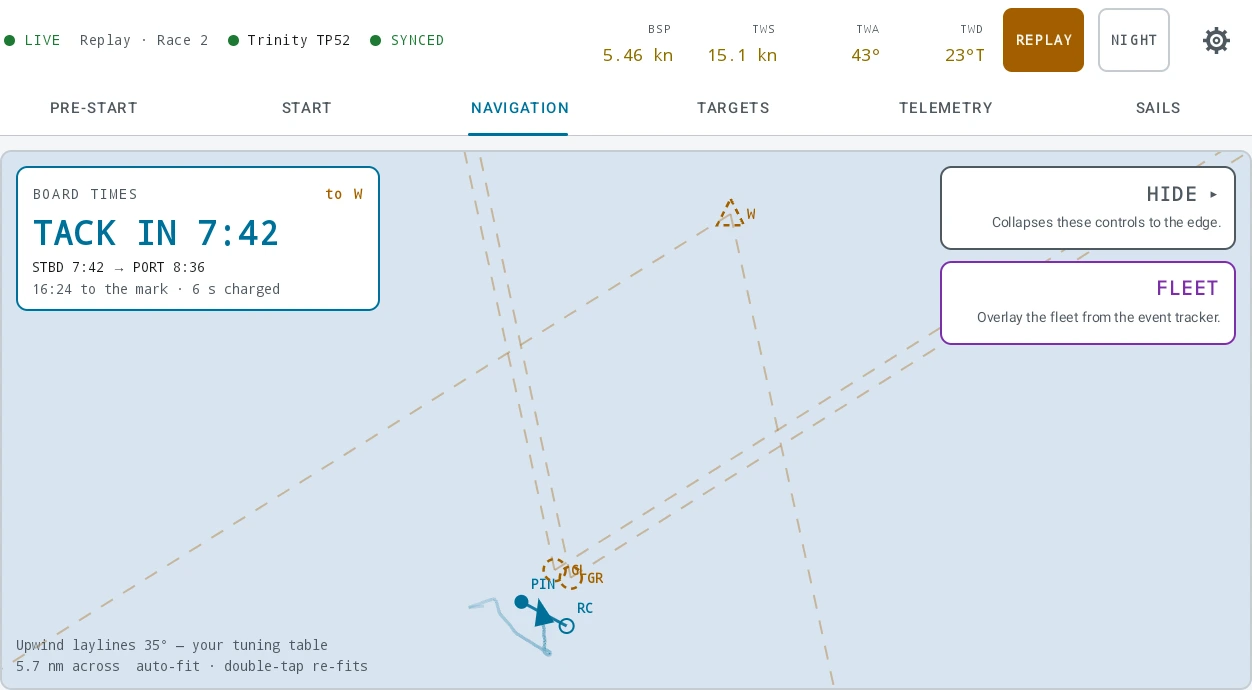
PATH AHEAD is not on the tab row on this kind of day, and that is not a licence question. It is a view of a route, and a windward/leeward course has none. It appears the moment a coastal or offshore plan with a route is loaded.
9 TARGETS between the marks
TARGETS reads the boat’s own tuning table, interpolated at the live true wind speed, with the upwind or downwind table picked from the boat’s angle. One tile per column of your table, in your table’s own order and under your own column names.
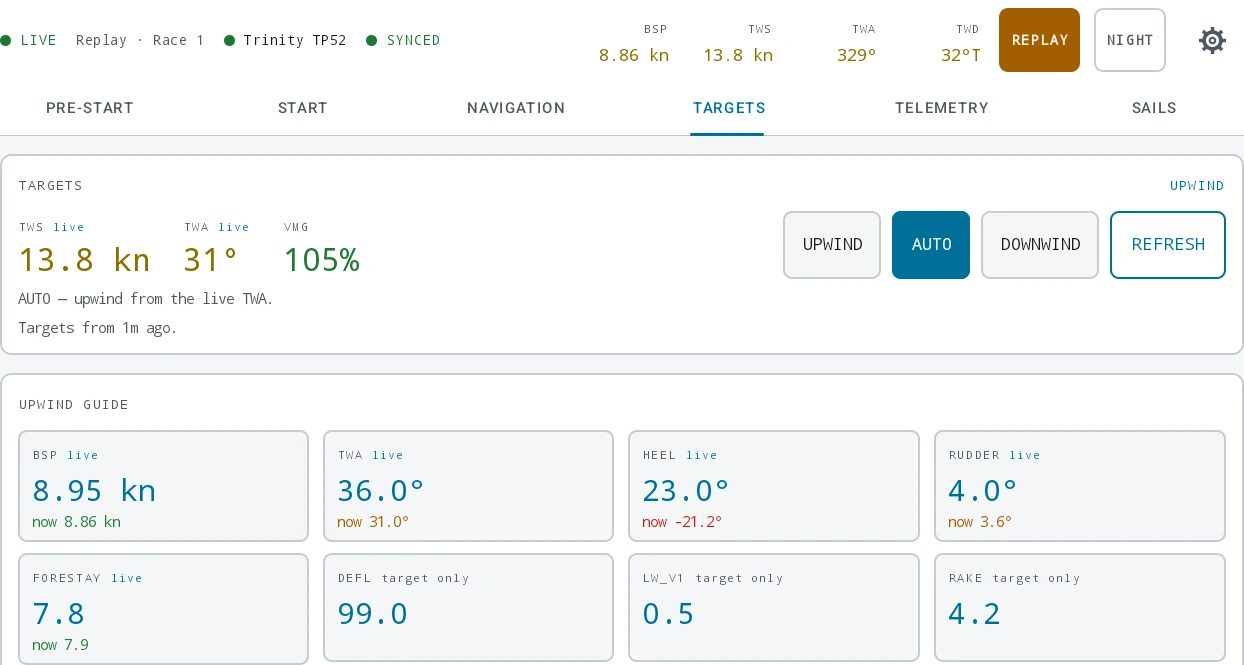
- The target is the large number and the boat’s own value sits under it with its grade. That is the inverse of the web player’s tuning window, deliberately: on the water the question is what to sail, not how far off you were.
- AUTO, UPWIND, DOWNWIND — the three-way picker holds a mode through a transition, and the choice is remembered per boat. AUTO also holds the table it was showing through a gap in the wind rather than flickering.
- A setting like
A2is shown as written and never graded. - A column wired to a channel whose instrument has gone quiet shows an em dash rather than the last value.
- COURSE PERF trims the course targets the way PERF trims the approach. The two are separate on purpose: a day can be a hundred per cent upwind and not in the last three minutes before a gun.
10 The second and third races
Nothing has to be reset between races, and two things carry over.
- The pinged line stays unless you clear it. Re-ping an end the committee moved; the platform reads the most recent ping at or before the instant being asked about, so race 1 keeps the line it was started on.
- The course stays on the plot. Press CLEAR COURSE when the committee lays a new one, and set the new radio course. It asks first.
Arming the next sequence re-arms FINISH and takes the next start number. Both the marks course and the pinged line expire at the venue’s midnight, and only a forward crossing rolls them — a clock correction walking backwards over midnight keeps what the crew are racing on.
11 TELEMETRY
TELEMETRY is the crew’s own instrument bank — the display bank this tablet stands in for. Press EDIT, then + ADD to pick channels out of the platform’s registry, and use the arrows to order them and the size control to make one double width. Up to twelve tiles, remembered per boat.

- Every edit writes through immediately, so DONE is just leaving edit mode. There is no cancel and no reset.
- Each channel is badged live or quiet against the feed. That is a badge and never a lock: a channel that has not spoken yet can still be picked.
- A stored tile whose channel this build has never heard of is kept, not dropped.
12 The sails log
SAILS is up, down, swap and docked, one tap each. + HOIST picks from the boat’s wardrobe; each flying sail gets a tile carrying the minutes it has been up and a DOWN chip; DOCKED takes everything down at once and confirms.
Hoist a second sail of a kind already up and the app asks whether you are replacing it or flying both. UNDO is not a special case: it emits the previous configuration, like any other tap.
Nothing takes a sail down for you. The platform cannot tell a sail still up from a tablet that died, so a sail left up carries on counting and the log says so. The sails log is the ashore half — correcting an interval, typing in the practice day, and the two analysis panels.
13 FINISH
Back on PRE-START, a card appears once a start stands. Press the green FINISH as the boat crosses and confirm.
What it replaces is a guess. Without it the platform estimates where a race stopped from the data’s own cadence, and an estimate can fold the sail home into the race. The press trims the derived race to the crossing.
14 After the day: the debrief
The day is in the debrief by the time you tie up. It arrives as one live import row per boat per UTC day, named Race Control live, and there is nothing to upload.
The races derive themselves
Nobody types a race into Nordic Stars. Regattas, days and races are derived from the guns and warnings inside the data, and recomputed every time another import lands — so a day that arrives as a telemetry log and a separate events file is still one regatta.
- Each warning is paired with the gun that followed it, and the race starts at the warning or ten minutes before the gun.
- A general recall voids the start it recalled, which is why STOP matters more than it looks: without it the recalled approach would stand as a race.
- Your FINISH press ends the race where the boat crossed. Without one, the end is estimated.
- A window nobody started — a practice segment, a tuning run before the first warning — can be added by hand on the regatta page. Derivation only ever produces the day’s starts.
How a race derives itself is the whole rule set, including what happens to two guns thirty seconds apart.
The sail log
The intervals recomputed from the day’s taps are already in the boat’s log. Correct one and your version stands: the recorded one is kept underneath, so the next tap on the boat neither overwrites what you typed nor puts a second copy beside it.
Rollups, and what the player reads
Telemetry is summarised as it arrives, at several levels, so the player can draw a whole race and a single tack from the same store without re-reading raw samples. Percent-of-target is computed against the boat’s perf polar, falling back to nav while there is no perf source.
Open Debrief, pick the regatta and the race, and scrub. The debrief player is the tour; rollups and series is how the summaries are built.
The start replays as numbers, not as a picture. The tablet recorded what the TIME TO LINE card showed, once a second, while the sequence was armed; the player draws those frames over your video. On the tablet, REPLAY goes further and recomputes the tiers, the burn, the bias and the laylines from the recorded channels — which is the only reason to review a start: not what the tablet said at the time, but what it would have said.
15 Where to go next
- Race Control on the boat — the same tablet from the licence up: access and seats, the telemetry setup flow, the status strip, the settings room and REPLAY.
- Planning a coastal or offshore race — the other kind of day, where the course is drawn ashore and routed.
- AIS, alarms and man overboard — the seven alarms and the ships around you, which are armed on any kind of day.
- Polars and targets — the numbers every screen above reads.